Businesses in ChatGPT: how to claim your business, use Business Hub and set up a Business Agent
 Tarun Kapoor
Updated 11 November 2026
85 min read
Businesses in ChatGPT is OpenAI's new beta programme that lets a company claim a verified profile inside ChatGPT, manage its information, see how often it's mentioned and clicked, and, if eligible, publish a Business Agent that answers customer questions. It launched on 10 November 2026 and is managed through Business Hub. Claiming is open to eligible businesses with a website. Business Agents are limited for now to eligible ecommerce and online service businesses in the US. This guide covers the claim and verification steps, what the insights really count, how to build and test an agent within OpenAI's policy, and what the launch does and doesn't change about your visibility.
The short version
- What launched (10 November 2026): OpenAI introduced Businesses in ChatGPT in beta. It has two parts: Business Hub, where a company claims its business, manages its information and sees insights, and Business Agents, which let customers chat with the business inside ChatGPT.
- Who can claim: eligible businesses with a website, located where ChatGPT is available. You don't need an Ads account, an Enterprise agreement or a Shopify store.
- How verification works: you claim with a business phone, business email, a DNS record on your domain, or a Shopify login. OpenAI reviews the claim. You then complete identity verification with Persona before you can publish changes, connect a feed, see insights or build an agent. The blue check appears after the Persona step is approved.
- Insights: mentions, website clicks and discovery topics over the past 28 days, in aggregate only. For an online business, a “mention” counts only when ChatGPT references your website. Your brand name alone doesn't count.
- Business Agents: available now to eligible ecommerce and online service businesses in the US. The agent explains products and policies and links to your site. It can't take payments, make bookings or look up orders.
- What it doesn't do: claiming doesn't guarantee higher placement or more recommendations. ChatGPT's answers stay independent, and businesses never see users' conversations or agent chats.

What OpenAI announced on 10 November 2026
On 10 November 2026 OpenAI published “Introducing Businesses in ChatGPT.” The post launches a beta that gives companies an official presence inside ChatGPT for the first time. Until now, a business could appear in ChatGPT in two ways. It could be mentioned or cited in an answer, which the business doesn't control. Or it could buy an ad, which sits apart from the answer. There was no way to tell ChatGPT “this is us, and this is our correct information.” Businesses in ChatGPT adds that.
OpenAI describes the launch as “a new way to connect with the 1.2 billion people who use ChatGPT each week.” It names three things a business can do through Business Hub: claim the business, manage its information, and see insights on how people engage with it. It then adds a fourth: Business Agents, a way for customers to start a conversation with the business itself, starting with eligible ecommerce and online service businesses in the United States.
Alongside the announcement, OpenAI published two new policies (a Businesses in ChatGPT policy and a Business Agents Policy, both dated 10 November 2026), a product page, and a detailed Help Center article on setup. Most of the practical detail in this guide comes from that Help Center article and the two policies. The announcement itself is short. I've read all of them, and where they differ I say so.
Here is the whole launch in one table:
| Part | What it does | Who can use it now | Cost |
|---|---|---|---|
| Claiming a business | Links a verified representative to the business's profile in ChatGPT | Eligible businesses with a website, where ChatGPT is available and verification is supported | No fee mentioned in any published source |
| Managing information | Update website, description, category, logo, delivery and return policies, cover photo; connect a product feed | Claimed businesses after Persona identity verification is approved | No fee mentioned |
| Insights | Mentions, website clicks and discovery topics for the past 28 days, aggregated | Claimed and Persona-verified businesses, when activity meets reporting thresholds | No fee mentioned |
| Business Agents | A clearly labelled chat where customers ask the business questions about products and policies | Eligible ecommerce and online service businesses in the US with a website | No fee mentioned for the agent itself |
| Sponsored Business Agent | Use the agent as the destination for ChatGPT Ads | Advertisers with an eligible agent | Paid, through ChatGPT Ads |
A note on the cost column. None of OpenAI's published pages mention a price for claiming, managing a profile, viewing insights or publishing an agent. The Help Center says plainly that you don't need an Ads account or a ChatGPT Enterprise agreement to claim an eligible business, and that claiming, publishing an agent and advertising are separate. I read that as free at launch, but OpenAI hasn't used the word, so I won't either.
OpenAI repeats one phrase from its earlier ads announcements: protecting the trust people place in ChatGPT “remains our North Star.” That matters for how you read everything below. Each feature in this launch comes with a limit that protects the user. Profiles don't buy rankings. Insights never expose conversations. Agent chats are labelled and kept apart from ChatGPT's own answers. If you plan around those limits you'll get more from the product than if you look for ways round them.
How to read this guide: facts from OpenAI's pages are stated as facts, with the source named where it matters. Recommendations are my own judgement from twelve years of media buying and from running ChatGPT campaigns and visibility work for clients. Where OpenAI hasn't published something, I say it's not published and don't fill the gap with a guess.
Who this guide is for
I've written it for three readers. The first is the owner or marketing lead of an online business who wants to know what to do this week. Start with how to claim and the 30-day plan. The second is the ecommerce or customer service lead who will build the agent. The sections on guidelines and testing are yours. The third is the analyst or agency who has to report on it. Read the insights sections closely, because the “mentions” number doesn't mean what its name suggests. Local businesses and large multi-brand groups have fewer options today, and I say plainly where those limits are so you don't lose time on steps that aren't open to you yet.
What is Businesses in ChatGPT?
Businesses in ChatGPT is OpenAI's programme that lets a company claim an official, verified profile inside ChatGPT, keep its information current, see aggregate data on how people engage with it, and, if eligible, publish a Business Agent that answers customer questions. It launched in beta on 10 November 2026. Companies manage all of it from a console called Business Hub.
It helps to see where this sits among the things OpenAI already offers businesses. Each one solves a different problem:
| Product | What it's for | Who controls the result |
|---|---|---|
| ChatGPT's own answers | Independent recommendations, comparisons and citations | ChatGPT. Businesses can only influence it by being accurate, well-documented and well-regarded on the open web |
| Businesses in ChatGPT (Business Hub) | A claimed profile with first-party information, plus insights | The business supplies information; ChatGPT decides when and how to use it |
| Business Agents | A separate, labelled conversation with the business | The business writes the instructions and information, within OpenAI's policy |
| Product feeds | Structured product data with prices and availability | The business supplies the data; ChatGPT decides what to show |
| ChatGPT Ads | Paid, labelled placements next to answers | The advertiser, through an auction |
The new layer is the second and third rows. Before this launch, the only first-party route into ChatGPT for most businesses was a product feed, and that only helped retailers. A software company, an online course provider or a service business had no official channel at all. Their presence in ChatGPT was whatever the model had learned or could find on the web.
The four jobs of Business Hub
Business Hub is the console. You open it from the ChatGPT sidebar when signed in, or at chatgpt.com/business-hub. It does four jobs, and they unlock in order:
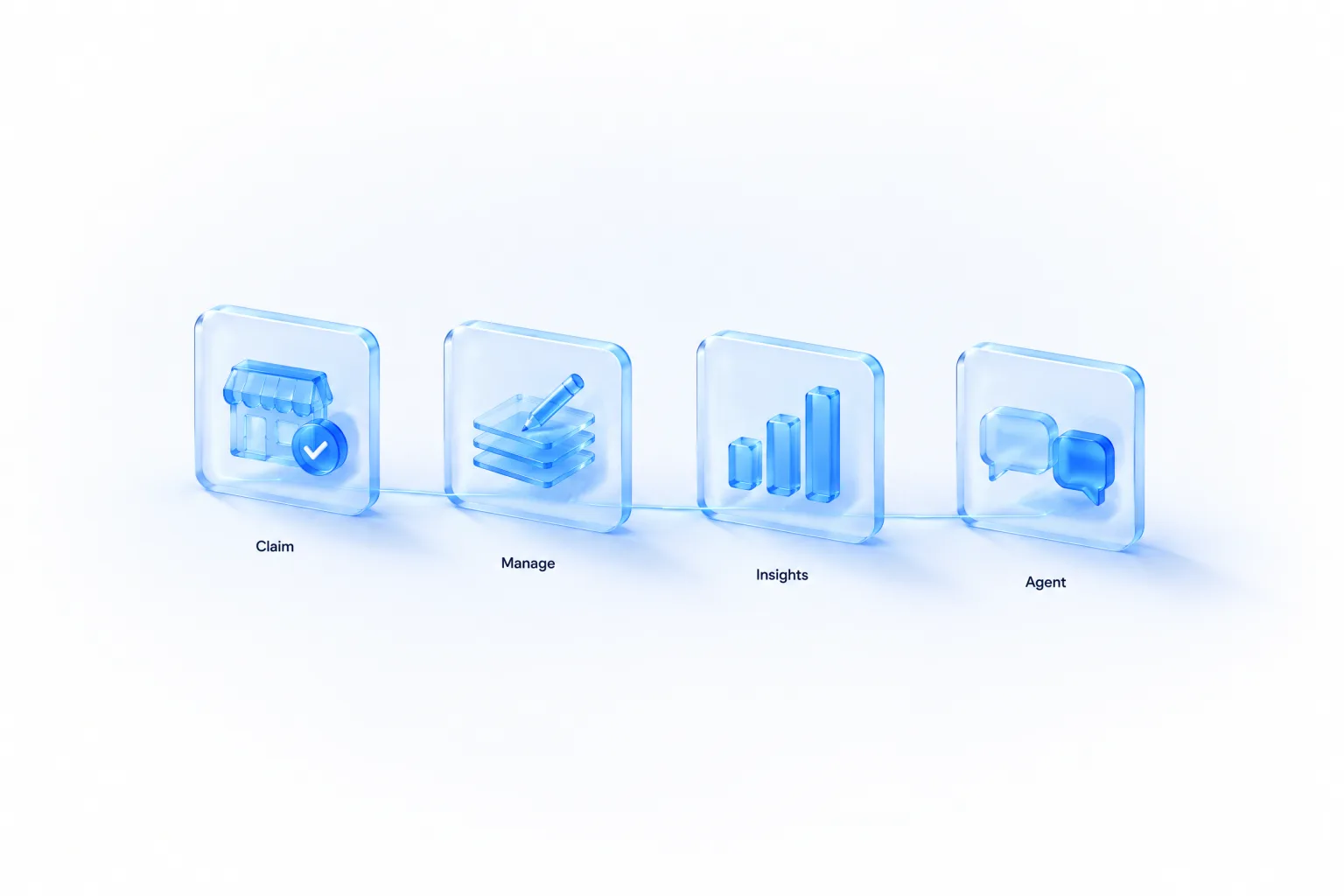
- Claim. Prove you represent the business. This gives you access to the profile in Business Hub.
- Manage. After identity verification, update the business's details and connect a product feed if you sell products.
- Insights. See how often ChatGPT mentions the business, how many people click through to the website, and the themes of the answers it appears in.
- Agent. If the business is eligible, build, test and publish a Business Agent.
You can stop at any step. OpenAI's Help Center is clear that claiming, publishing an agent and advertising are separate decisions. Plenty of businesses will claim, fix their information, look at insights and go no further. That is still worth doing, and I explain why below.
The profile
The thing you're claiming is a business profile. OpenAI says that when a business appears in a model response, people can click to see the business's ChatGPT profile. Based on OpenAI's launch images, a verified profile shows the business's name and logo, a blue check, business details, products, and buttons to start a chat with the Business Agent (if there is one) or visit the website. The exact layout may change during the beta.
One detail in the Businesses in ChatGPT policy deserves attention: “Profiles may also include information from other sources.” A profile is not a page you fully own, like your website. It is ChatGPT's view of your business, to which you can now contribute verified information. The Help Center says the same about answers: ChatGPT may use other sources when answering questions about your business. Your contribution is one input, an important one, but not the only one.
Who can claim a business, and who can't yet
Eligibility has two levels. The bar for claiming a business is lower than the bar for publishing an agent.
Claiming
OpenAI says any eligible business located where ChatGPT is available can claim through Business Hub. The product page adds that eligibility depends on industry, location, and OpenAI's verification and integrity checks, and that claiming is initially available to eligible businesses with a website. You must own the business or be authorised to represent it.
The Help Center adds three practical facts:
- You don't need an Ads account or a ChatGPT Enterprise agreement.
- Eligible businesses can claim an existing listing or add one, where ChatGPT is available and the required verification is supported.
- Local stores and restaurants can currently claim only an existing US listing. If you run an eligible online business and can't find your listing, you may see an option to add it.
That last point is easy to miss. Online businesses have a route to create a profile. Physical local businesses, for now, can only claim a listing ChatGPT already has, and only in the US. A café in Manchester or a dental practice in Toronto can't add itself today.
Three routes in
| If you are… | Your route | Notes |
|---|---|---|
| Any eligible business | Self-serve in Business Hub | Search for the business, pick a verification method, wait for review |
| An existing OpenAI Enterprise customer or advertiser | Through your OpenAI representative | OpenAI says these customers can work directly with their rep to claim. Some brands use a “managed claim process” |
| A Shopify merchant | Connect the store from Business Hub or the Shopify admin | Streamlines verification. Eligible products are already in ChatGPT through Shopify Catalog |
Business Agents
Agents have separate, stricter requirements. They're available to eligible ecommerce and online service businesses in the US with a website, and the business must meet the requirements in the Business Agents Policy. That policy says OpenAI considers both the business category and the agent's intended use before allowing publication, may decline access or defer a category until it can support it safely, and that business verification alone does not guarantee agent eligibility.
OpenAI's announcement links to the policy for “eligible categories.” As of 11 November 2026, the policy doesn't contain a list of named categories. It describes the principles and the review. So I can't give you a table of allowed industries, and you should be wary of anyone who does. The practical test is the one in Business Hub itself: after your claim and Persona verification are approved, either the option to create an agent is there or it isn't.
Who is likely to be declined
The Businesses in ChatGPT policy says not every business can create or claim a profile. OpenAI may decline a request when a business's offerings or practices raise significant safety or integrity concerns, and may hold off on whole categories until it has the safeguards to support them. It doesn't name those categories either. For products, the Commerce policies (updated 29 September 2026) give a strong hint. They prohibit, among other things, alcohol, tobacco and nicotine, weapons, adult products, gambling, prescription medicines, supplements, crypto, and debt relief. If your business sits mainly in one of those areas, expect difficulty with feeds at least, and possibly with the profile.
What claiming changes, and what it doesn't
This is the question I've been asked most since the announcement. The answer comes straight from OpenAI's own pages.
| Claiming does | Claiming does not |
|---|---|
| Let you update your business information in ChatGPT | Guarantee higher placement or sales |
| Let you connect a product feed with prices and availability | Guarantee that ChatGPT recommends your products |
| Give you aggregate insights on mentions, clicks and topics | Give you users' conversations, prompts or agent chats |
| Show a blue check on your profile once identity verification is approved | Change your profile's visibility in ChatGPT (claiming or disputing ownership doesn't affect it) |
| Let you create a Business Agent, if eligible | Give you control over ChatGPT's independent recommendations and comparisons |
| Let you add teammates and an agency | Let you delete, unpublish or hide a published profile |
OpenAI states the central point twice. On the product page: “ChatGPT continues to make independent recommendations and comparisons. Claiming does not guarantee higher placement or sales.” In the Help Center: claiming “doesn't guarantee increased visibility or give you direct control over ChatGPT's independent recommendations. Advertising doesn't influence ChatGPT's independent answers.”
Also worth knowing: you show up whether or not you claim. The product page says ChatGPT may show information about your business when customers ask relevant questions, with or without an agent. Not claiming doesn't remove you from ChatGPT. It only means the information comes entirely from other sources.
So is it worth claiming?
Yes, for almost every eligible business, and for four reasons that don't depend on rankings.
- Accuracy. ChatGPT answers questions about your return policy, delivery terms and prices whether you help or not. With a claimed profile and a feed, it has a first-party source to draw on. Wrong answers about your business cost you customers you never see.
- Data you can't get anywhere else. Business Hub's insights are the first numbers from OpenAI itself on how often your website is referenced in ChatGPT. Third-party tools estimate this by sampling prompts. This is the platform's own count, with limits I cover in the insights section.
- Protection. Claiming puts a verified owner on the profile. The policies ban impersonation, but a claimed and verified profile is harder to impersonate than an unclaimed one, and you're the one who gets to dispute problems.
- Readiness. Agents, sponsored agents and whatever comes next all require a claimed, verified business. Verification involves a review queue. Being through it early costs nothing.
The honest caveat: none of this is a visibility lever. If ChatGPT recommends your competitors today, claiming your profile won't change that. The work that does is covered in why ChatGPT recommends competitors and how to appear in ChatGPT answers.
How to claim your business in ChatGPT, step by step
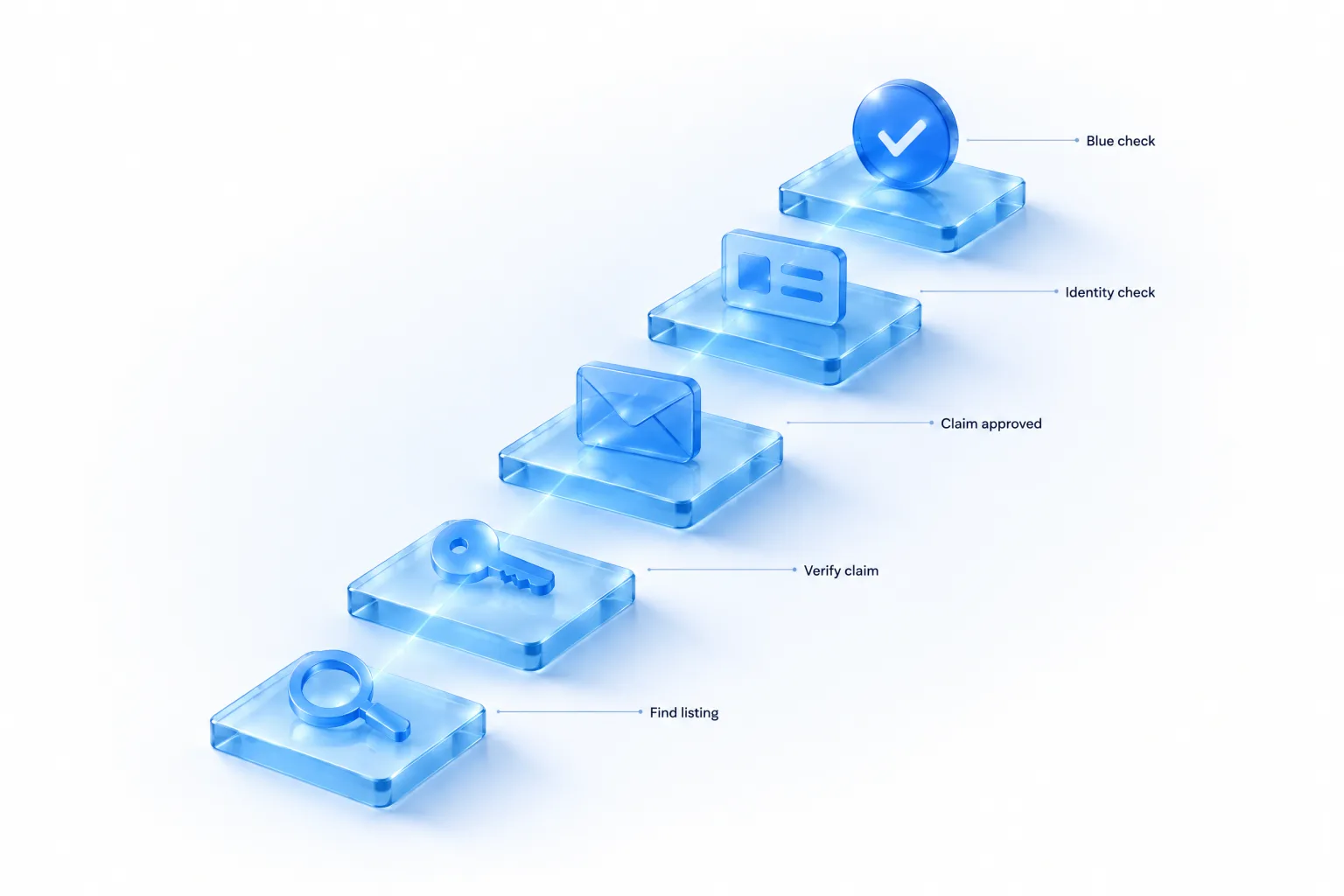
The steps below follow OpenAI's Help Center article “Setting up your business on ChatGPT.” I've added what to prepare and where people get stuck. There are two separate verifications, and mixing them up is the most common cause of confusion: first you verify the claim (prove a link to the business), then you verify your identity with Persona (prove who you are and that you're authorised).
Before you start: what to have ready
- A ChatGPT account you intend to keep using for this. The claim attaches to the account you confirm during setup. Use a company-controlled account, not a personal one that leaves with an employee. If your company uses a ChatGPT workspace, read the team access section first, because the workspace affects who you can invite later.
- Access to one verification channel: the business phone line, a business email inbox, your domain's DNS settings, or your Shopify admin.
- Identity and business documents. The Help Center says you may need a government-issued ID, business registration information, and proof that you're authorised to represent the business.
- Your official business details, exactly as registered. Name, address and any registration or tax number must match your official records. Mismatches are a named cause of failed checks.
Step 1: find your listing
Sign in to ChatGPT and open Business Hub from the sidebar. Search for your business by name. Select the listing that matches and confirm the ChatGPT account you'll use to manage it.
Three things can happen instead of a clean match:
| What you see | What it means | What to do |
|---|---|---|
| “Contact support” | The listing is locked | Select Contact support to request help with access. Brands on a managed claim process have location profiles locked by default |
| No listing found | ChatGPT doesn't have a profile for the business yet | Eligible online businesses may see an option to add one. Local stores and restaurants can currently claim only an existing US listing |
| The business is already claimed | Someone else holds the claim | Open the profile, select the more options menu (•••), then Dispute ownership |
If you received a claim invitation by email, the process is different: open the personal link in the email and sign in with the email address that received it. Don't forward that link to a colleague or an agency. The Help Center says explicitly not to forward a personal claim invitation to give someone access.
Step 2: verify your claim
Business Hub shows the verification methods available for your business. Not every method is offered for every listing. OpenAI lists four.
| Method | How it works | Best for | Watch out for |
|---|---|---|---|
| Business phone | Choose a text message or automated call, select Get code, enter the code sent to the number shown | Businesses with a staffed main line | The code goes to the number on the listing, not one you type in. If that's a call-centre menu or an old number, pick another method |
| Business email | Select Get code and enter the code sent to the email address associated with the business | Small businesses where the owner reads the main inbox | Shared inboxes like info@ are often unmonitored. Check who receives it before you request the code |
| Website domain | Add the TXT record shown in ChatGPT to your domain's DNS, then select Verify domain | Any business with access to its DNS. The most robust proof of control | Copy type, name or host, and value exactly. DNS changes can take time to appear |
| Shopify store | Select Connect Shopify, review the permissions, log in to the store for the business you're claiming | Shopify merchants | Log in to the right store if you run several |
My recommendation is the website domain method wherever you have DNS access. It doesn't depend on who answers a phone or reads an inbox, it's the same method you've used for Google Search Console and email authentication, and it proves control of the asset ChatGPT actually cites. If someone else manages your domain, send them the three values and ask them to add the record. Leave the TXT record in place afterwards. OpenAI doesn't say whether it re-checks, and removing verification records is a classic way to lose access on other platforms.
Step 3: wait for claim approval
OpenAI reviews the claim and emails you its decision or a request for more information. While it's under review you can select Cancel claim. OpenAI doesn't publish review times, and the Help Center says only that review time varies. Once the claim is approved you can access the business in Business Hub. You can't yet publish changes, view insights or create an agent. That needs the next step.
Step 4: complete identity verification with Persona
Persona is a third-party identity verification provider. OpenAI requires Persona verification before you can:
- publish changes to your business information,
- connect a product feed,
- view insights, or
- create a business agent, if your business is eligible.
In Business Hub, select Verify with Persona, then Continue to Persona, and follow the instructions. If you started with another method and skipped this, you can come back: open the Business tab, select your profile, find “Complete verification with Persona” in the overview and select Verify.
OpenAI then reviews the submission and emails a decision or a request for more information. Submitting to Persona is not the same as being approved. Features that need Persona stay locked until approval arrives.
Step 5: the blue check
The verified badge, shown as a blue check, appears after your Persona verification is approved. OpenAI's product page says the blue check shows a profile has “been claimed.” The Help Center is more precise: claiming alone doesn't give the profile a verified badge. Go by the Help Center. If you've claimed and there's no check, the Persona step is what's missing.
What the blue check means, and doesn't
The check tells a user that a verified representative manages the profile. It's not an endorsement by OpenAI, a quality rating or a ranking signal. The Business Agents Policy forbids making an agent appear “endorsed by OpenAI,” and the same caution belongs in your marketing. “Verified on ChatGPT” is accurate. “Recommended by ChatGPT” is not something a blue check gives you the right to say.
When verification goes wrong
Most of the problems people will hit are covered in the Help Center. Here they are in one place.
| Problem | What OpenAI says | My advice |
|---|---|---|
| Claim or Persona check is pending | Wait for the decision or request for information by email. Wait for the review to finish before trying again | Don't resubmit while pending. Check spam folders for the email |
| Persona check failed or expired | Follow the instructions in the email. If Try again is available, select it and submit corrected information | Compare what you entered with your registration documents character by character. Trading names versus legal names cause most mismatches |
| Approved by email, but Business Hub still shows incomplete | Contact OpenAI Support with the step, any error message and a screenshot with sensitive information removed | Screenshot the approval email too |
| Someone else has claimed your business | Dispute ownership from the profile's more options menu and verify with Persona | Find out first whether a colleague, a former agency or a franchise head office made the claim. An internal fix is faster than a dispute |
| Can't create an agent | Check you're on the claimed profile and Persona is approved. The business must also meet location, type and industry requirements | If all of that is in order and there's no option, your category probably isn't supported yet |
| Updated details haven't appeared | OpenAI reviews and publishes changes. Updates take time, and ChatGPT may draw on other sources | Fix the same detail on your website and other listings so the other sources agree |
| Want to remove a published profile | Support can't delete, unpublish or hide a published profile as part of a setup or ownership request | Plan on the profile being permanent. Get it right rather than hoping to withdraw it |
Teammates, agencies, and businesses with many brands or locations
Adding people
The admin who claimed the business can add teammates in Business Hub and grant an agency access to manage the business or its agent. Each person uses their own ChatGPT account. Two limits apply:
- Invitations can depend on the account used to claim. If the business was claimed inside a ChatGPT workspace, invitees may need to be members of that workspace. That can block an outside agency. If an agency invitation is blocked, OpenAI says to contact Support to check the options.
- Never share access by forwarding a personal claim invitation. It's tied to the recipient.
Decide who holds the admin claim before anyone clicks anything. In my experience, most platform access problems come from an account first set up by a junior employee, a freelancer or an agency who later left. The admin should be a company-owned account with a role-based email address, and at least two people in the company should know how to reach it.
Multiple brands and locations
This is the least developed part of the beta. The Help Center says:
- Each distinct brand is managed separately.
- Central management across a parent company's brands and locations isn't currently available.
- Claiming the main brand doesn't claim its locations.
- For brands using a managed claim process, individual location profiles remain locked by default. Ask your OpenAI account contact about the supported claim path.
If you run a group with five brands, that's five claims and five verifications. If you run a chain with 300 stores, there's no bulk tool today, and OpenAI's announcement says tools for “organizations with more complex needs” are planned. For chains and franchises the sensible first move is to claim the main brand, talk to your OpenAI contact if you have one, and make sure franchisees or store managers don't start claiming locations individually without a plan. Sorting out fifty separate claims made by fifty people is harder than waiting a few weeks for a supported path.
For agencies
Agencies should be granted access by the client's admin, not make the claim themselves. Persona verification asks for proof that you're authorised to represent the business, and a claim owned by an agency account becomes a problem the day the contract ends. Ask the client to claim and verify, then add you. Our guide to account, brand and legal names in ChatGPT Ads covers the same ownership principle for ad accounts.
Managing your business information
After your claim and Persona verification are approved, open your profile in the Business tab. The Help Center lists what you can update: website, business description, product or service category, logo, delivery policy and return policy, plus a cover photo and other optional details. OpenAI reviews changes before publishing them, and updates can take time to appear in a listing or a ChatGPT answer.
The Businesses in ChatGPT policy describes the wider set of information a profile can hold: business name, category, address or service area, hours, contact details, and the products or services offered. Not every field will apply to every business.
Field by field
| Field | Why it matters in ChatGPT | How to fill it well |
|---|---|---|
| Website | For online businesses, a mention is counted when ChatGPT references the website. This is the asset your insights hang on | Use the canonical domain, the same one you verified. One domain, not a mix of regional variants |
| Business description | ChatGPT may use it to answer “what does this company do” and to decide when you're relevant | Say what you sell, to whom, and what's different, in plain words. See the worked example below |
| Product or service category | Affects what kind of business ChatGPT treats you as, and possibly agent eligibility | Pick the most specific accurate category. Don't pick a broader one hoping for more reach |
| Logo | Identity on the profile and in the agent chat | The same mark you use everywhere else. You must have the rights to it |
| Delivery policy | Delivery questions are some of the most common pre-purchase questions. The agent uses this too | Costs, thresholds, regions and timeframes stated as facts, with no “usually” unless that's true |
| Return policy | OpenAI's own example test question for agents is “Can I return an item I bought on sale?” | Cover the awkward cases: sale items, opened items, who pays return postage, time limits |
| Cover photo | Visual identity on the profile | A real image of your products or place. No text-heavy banners, nothing that could be read as an OpenAI endorsement |
Writing the business description
Most descriptions will be written like an “About us” paragraph: warm, vague and no help to a model trying to answer a specific question. Write it for the job it has to do. ChatGPT needs to know what you sell, who it suits, where you operate and what makes you a sensible answer to a particular kind of question.
An illustrative before and after, for a fictional online retailer:
BEFORE
Welcome to Fernhill & Co! We're passionate about bringing you the
very best in home fragrance. Our journey started in 2019 with a
simple dream. Discover the difference today.

AFTER
Fernhill & Co makes soy-wax candles and reed diffusers, hand-poured
in Leeds, UK. Around 40 scents, from £14. All products are vegan and
use cotton wicks and recyclable glass. We ship across the UK in 2-3
working days (free over £40) and to the EU. Gift sets and a monthly
candle subscription are available. Wholesale for independent shops.
The second version answers a dozen questions a shopper might ask ChatGPT: where it's made, what it costs, whether it's vegan, how fast it ships, whether there are gift sets. The first answers none. The policy also draws the line you need to stay inside. You may describe the business in your own voice, but information must truthfully represent the business, and you must not make false or misleading claims about prices, availability, qualifications or likely results. Every number in the “after” version has to be true and kept true.
Keep it consistent with everything else
Because ChatGPT may also use other sources, a perfect profile sitting next to a contradictory website doesn't fix the problem. If your profile says free delivery over £40 and your site's footer still says £50, the model has two first-party claims and may repeat either. Before you publish changes in Business Hub, check the same facts on:
- your own delivery, returns and pricing pages,
- your product feed,
- structured data on your site,
- your other business listings and marketplaces,
- your help centre and old blog posts that state policies.
Then set a review date. The policy says information must be “kept current,” and stale policies are the usual way a business ends up making misleading claims without meaning to. I put a quarterly check in the calendar and an extra one whenever prices, delivery terms or return rules change.
Connecting a product feed
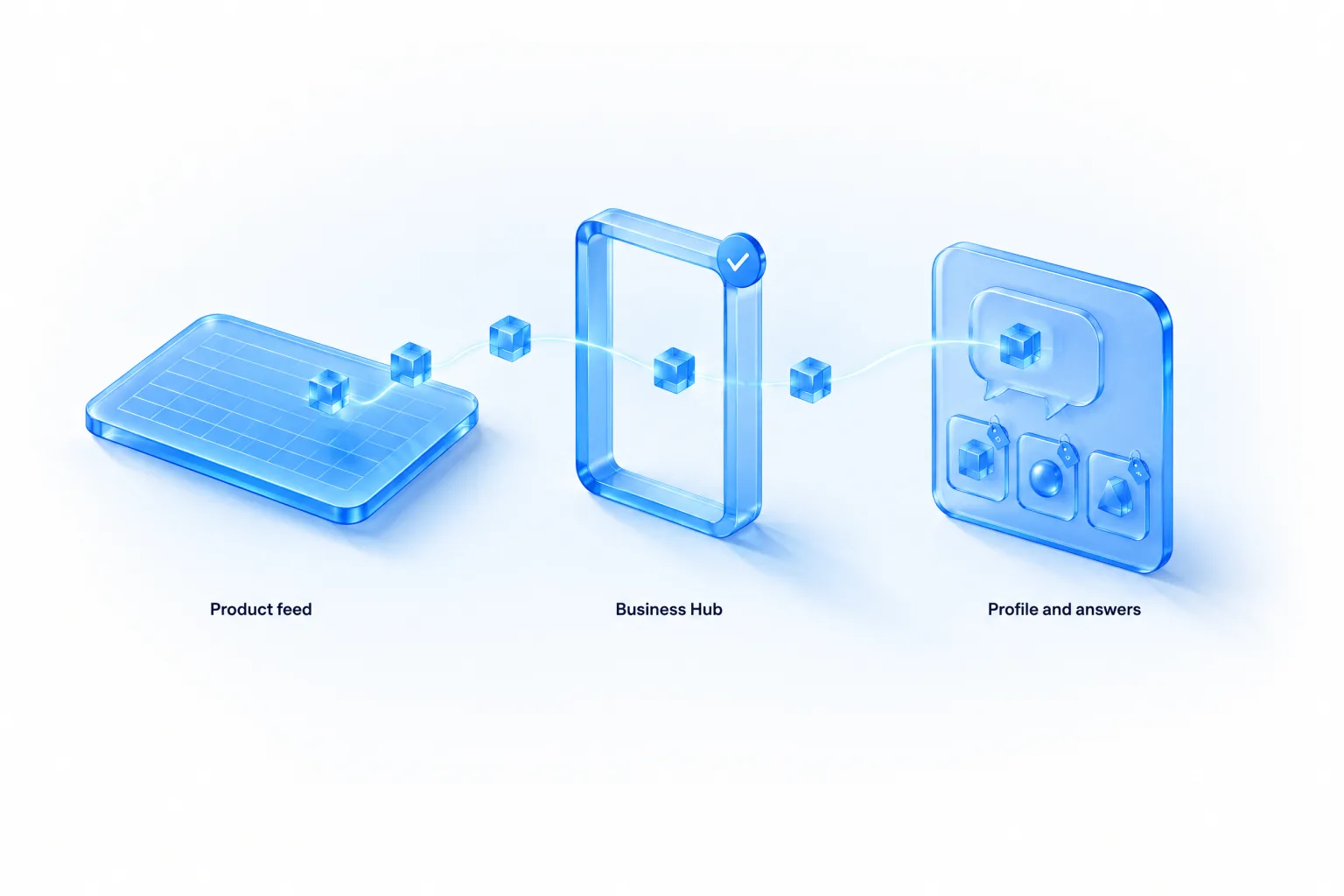
If you sell products, you can connect a product feed to share prices and availability. OpenAI's announcement calls these “self-service product feeds.” That's a real change. Until now, the organic commerce feed route has been application-based, as our product feed guide explains. Business Hub gives verified businesses a direct way to supply one, and OpenAI's developer guide now starts every feed submission here. For the upload itself (the 11 required fields, and the choice between manual upload, a hosted URL and SFTP), see how to submit products through Business Hub.
What the Help Center says:
- You can upload a CSV product feed that follows the product feed specification, including its required fields.
- You can provide a hosted URL instead. If you do, link to the feed file itself.
- A Shopify feed can be connected directly.
- Products in the feed must follow the Commerce policies.
- Connecting a feed doesn't publish an agent and doesn't guarantee that ChatGPT recommends your products.
- Connecting a feed requires Persona verification to be approved first.
The feed specification, required fields, conditional fields and the common reasons products get rejected are covered in depth in our ChatGPT product feed guide, so I won't repeat them here. Three points are specific to Business Hub:
- Prefer a hosted URL over a one-off CSV upload if your prices or stock change more than occasionally. A file you upload once goes stale the day your first price changes. A hosted file that your platform regenerates stays current. OpenAI hasn't published how often it re-fetches a hosted feed in Business Hub, so check the feed status after your first price change to see how quickly it's picked up.
- If you also run product feed ad campaigns, keep the two feeds in agreement. Ads Manager has its own feed for paid campaigns. OpenAI hasn't said whether a Business Hub feed and an Ads Manager feed are linked. Until it does, treat them as two destinations fed from one source of truth, so a price can't differ between your profile and your ad.
- Check the Commerce policies before you upload. Listings for prohibited products can be removed and merchant participation restricted. If part of your catalogue is prohibited, such as a homeware shop that also sells wine, exclude those items from the feed rather than hoping they're filtered.
The Shopify route
Shopify merchants get the shortest path. OpenAI describes three steps:
- Connect your Shopify store. Link it in your Shopify admin (through the ChatGPT app in the Shopify App Store) or from Business Hub.
- Review your business information. Your current product details, pricing and availability are shared automatically through Shopify's catalog.
- Preview and publish your agent. Test the Business Agent and publish when you're ready.
Four clarifications that will save Shopify merchants some confusion:
- Your products are probably already in ChatGPT. OpenAI says eligible products from Shopify merchants are already integrated through Shopify Catalog. Connecting your store in Business Hub is about verification, the profile, insights and the agent, not about getting products in for the first time.
- Shopify verification doesn't replace Persona. Connecting Shopify verifies the claim. The Help Center still requires Persona verification before you can publish changes, view insights or create an agent.
- A draft agent may be created for you. The Help Center mentions that Shopify setup may already have created a draft agent. It isn't live until you review it and select Publish. Customers can only chat with a published agent.
- You don't need Shopify. OpenAI says so directly: Shopify is one way to get started, and eligible businesses can set up an agent with or without it.
For catalogue, storefront and order questions, OpenAI Support points merchants back to Shopify's own help on Agentic Storefronts. OpenAI can't manage your Shopify admin, catalogue or storefront settings.
The rules for profile content
The Businesses in ChatGPT policy (10 November 2026) applies when a business or its representative creates, claims or edits a profile, including details, descriptions, photos, services and links. In summary:
| Rule | What it says | Common way to break it by accident |
|---|---|---|
| Manage only businesses you represent | No impersonation, fake or duplicate profiles, or misrepresenting ownership, affiliation, credentials or endorsements | A reseller claiming the brand's profile instead of its own; duplicate profiles for one business |
| Accurate information | Name, category, address or service area, hours, contact details and offerings must be truthful and current. No false claims about prices, availability, qualifications or likely results | Old prices; “in stock” items that aren't; keyword-stuffed business names |
| Offensive content | Content must suit a broad audience. Obscene, gratuitously profane or shocking material may be rejected, including in names or branding | Edgy product names in the description |
| Discrimination and harassment | No slurs, demeaning content or targeting of individuals | Rare for businesses, but applies to replies and comparisons with named people |
| Sexual or graphic content | None in descriptions, photos or other profile content | Product photography for swimwear, lingerie or medical products that crosses the line |
| Misleading promotion | No fabricated reviews or endorsements, unsupported guarantees, or claims that hide material terms such as fees or conditions | “Free delivery” without the threshold; “#1 rated” without a source |
| Privacy and rights | No publishing another person's private information. Use photos and logos only with rights or permission | Customer photos used without consent; partner logos used as endorsements |
| Links | Must be relevant and accurately represent where they lead. No deceptive redirects | Tracking redirects through third-party link shorteners; links to unrelated sister brands |
On enforcement, OpenAI may decline or remove submitted content, limit profile management, or remove a profile. One sentence is worth quoting because it sets expectations on both sides: businesses “remain responsible for the information they provide even though OpenAI does not verify every detail or resolve every factual dispute.” You're accountable for accuracy, and OpenAI isn't promising to referee disagreements about facts.
Build an information inventory before you touch Business Hub
Everything in this product runs on facts about your business: the profile, the feed, the agent. Most businesses hold those facts in scattered places. Some are on the website, some in a PDF, some in the head of the person who answers the phone. The most valuable hour you can spend this week is writing them down in one document. It will feed the profile, the agent and your own website, and it's the thing you'll update when something changes.
The inventory, in seven sections
| Section | Facts to record | Where it's used |
|---|---|---|
| Identity | Legal name, trading name, registration or tax number, registered address, website domain, main phone and email | Claim, Persona, profile |
| What you sell | Product or service lines in one sentence each, who each is for, starting prices, what's included and excluded | Description, agent |
| Prices and fees | Price lists or plan prices, every surcharge and mandatory fee, taxes, currency, when prices last changed | Feed, agent, website |
| Delivery or fulfilment | Regions served, costs, free-delivery thresholds, timeframes, carriers, cut-off times, what happens with delays | Delivery policy, agent |
| Returns, cancellation and warranty | Time limits, condition rules, sale items, opened items, who pays postage, refund method and timing, warranty length and cover | Return policy, agent |
| Fit and compatibility | Sizes, dimensions, materials, compatibility lists, system requirements, integrations, limits per plan | Feed, agent |
| Boundaries | What you don't sell, where you don't ship, what you won't advise on, who to contact for what | Agent guidelines |
Mine your own support inbox
The quickest way to fill the inventory is to read your last 200 pre-sales emails, chat logs or call notes and list the questions. In my experience a business gets the same fifteen to twenty-five questions over and over. Those are the questions people will put to ChatGPT about you and to your agent. For each one, write the answer you'd want given, and check that the same answer is on your website.
Questions that come up in almost every business:
- How much is it, including everything?
- How long will it take to arrive, or to get started?
- Do you deliver to, or serve, my area?
- Can I return it or cancel, and what does that cost me?
- What's the difference between option A and option B?
- Will it work with what I already have?
- What size or plan do I need?
- Is there a guarantee or warranty?
- Is there a discount, a trial or a sample?
- How do I contact a person?
Put the facts in text on your website
The scenario later in this guide includes a compatibility table that existed only as an image. That's common, and it matters beyond the agent. ChatGPT can only cite and use what it can read. Size charts as images, policies inside PDFs, and prices that only appear after a form is submitted are all facts ChatGPT can't easily see. Moving them into plain text on a page helps your profile, your agent, ChatGPT's own answers and every other search system at once. Our guide to how brands appear in ChatGPT explains what the model can and can't pick up from a site.
One owner, one document, one date
Give the inventory an owner and a “last reviewed” date at the top. When a price or policy changes, the inventory changes first, and the website, feed, profile and agent are updated from it. It sounds bureaucratic for a small business. It's a single shared document, and it's what stops four copies of your return policy drifting apart.
Business Hub insights: what you can see
For anyone who has tried to measure visibility in ChatGPT, this is the most significant part of the launch. Until now, every number on “how often does ChatGPT mention us” has been an outside estimate, produced by sending sample prompts and counting. Business Hub gives claimed, verified businesses OpenAI's own aggregate counts.
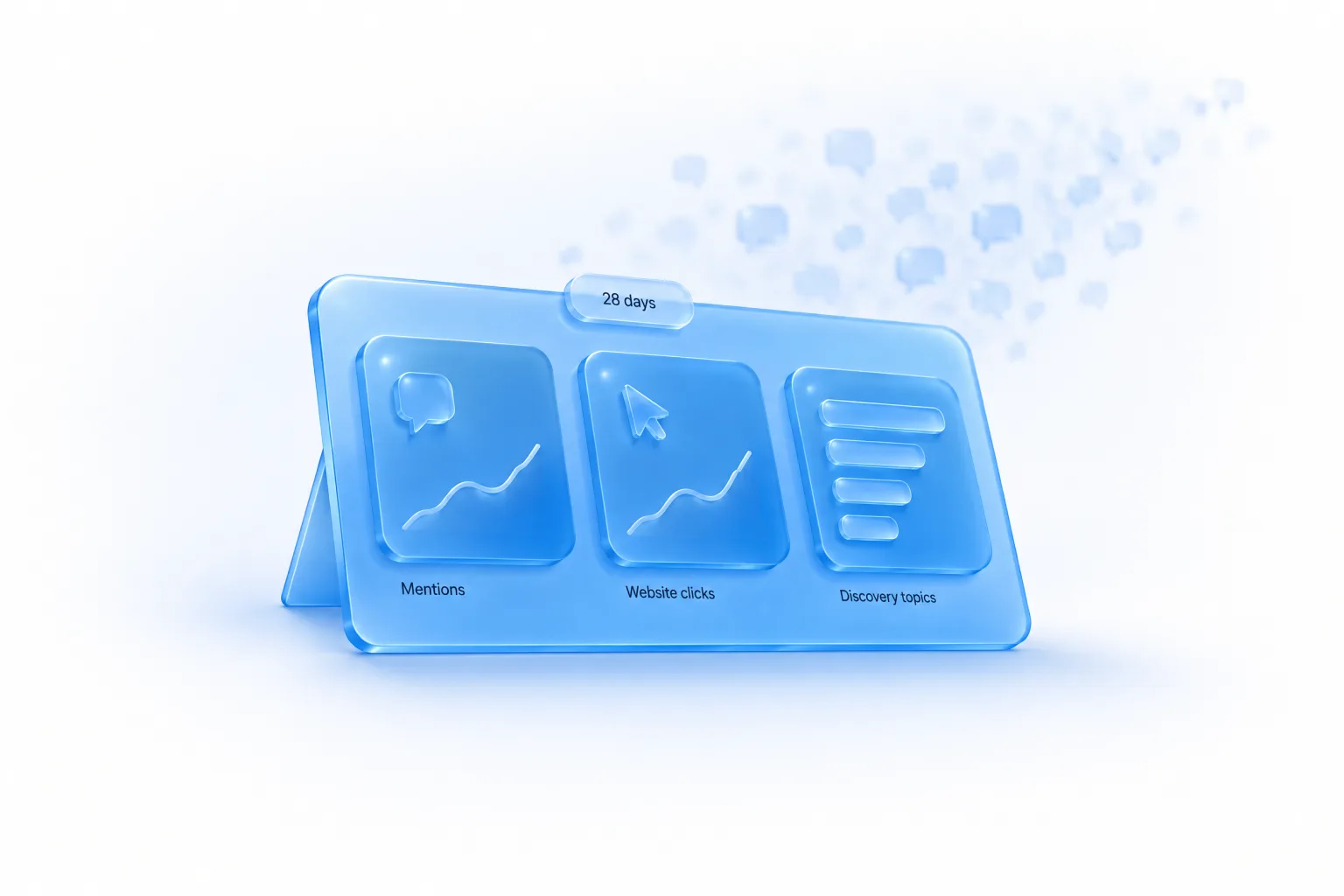
After your claim and Persona verification are approved, open your business in Business Hub and select Insights. The Help Center says insights show aggregate activity over the past 28 days, including three things: mentions, website clicks and discovery topics. OpenAI's launch image of the dashboard also shows a “profile views” figure. That metric isn't defined in the Help Center yet, so I treat it as present but undocumented.
Mentions: read the definition carefully
“Mentions” doesn't mean what most marketers will assume. The Help Center defines it differently for online and local businesses:
| Business type | A mention counts when… | It does not count when… |
|---|---|---|
| Online business | ChatGPT references the business's website | ChatGPT names the brand without referencing the website. “The brand name alone doesn't count” |
| Local business | ChatGPT shows a result for that location, even if the customer doesn't open the listing or visit the website | Not stated |
For online businesses this has a big consequence. If a user asks “what are the best project management tools for a small agency” and ChatGPT answers from its training knowledge, naming your product in a list without citing your site, that isn't a recorded mention. The Help Center has a FAQ on exactly this: a business can be named in an answer without a recorded mention.
So the Business Hub mentions figure is closer to “answers that cited or linked our website” than to “answers that talked about us.” Both matter, but they're different things:
- Website references mostly happen when ChatGPT searches the web or draws on your feed and links to its sources. They're the mentions most likely to produce a click.
- Name-only mentions happen when the model answers from what it already knows. They build awareness and shortlist presence, and they're invisible in Business Hub.
A brand that's well known to the model but rarely cited could see a low mentions number in Business Hub while being named constantly. A brand with heavily cited content could see the opposite. Don't present the Business Hub figure to your board as “total ChatGPT mentions.” Call it what it is: website references.
Website clicks
The Help Center's definition is short: see how often people click through to your website. This is the first-party version of the number you've been estimating from referral traffic in your analytics. Expect the two to differ. Analytics tools lose referrers, some ChatGPT traffic arrives without one, and app traffic behaves differently from web traffic. Our guide to tracking ChatGPT visibility covers the referral side. Run the two numbers next to each other for a few weeks and learn the usual gap, rather than expecting them to match.
Discovery topics
OpenAI's announcement describes discovery topics as “common themes across conversations where their website is cited.” The Help Center describes them as common themes in ChatGPT answers that mentioned or cited your business, and adds two limits:
- They don't reveal individual prompts.
- They don't directly measure customer intent. They're aggregate categories, not a report of what customers wanted.
The distinction between themes in answers and what users asked is subtle and worth holding on to. A discovery topic of “gift ideas” tells you your site was cited in answers about gifts. It doesn't tell you that people asked for you, or that they were ready to buy. It's a map of where ChatGPT currently finds your site useful.
Privacy limits and thresholds
OpenAI built the insights to protect users, and says so plainly:
- It doesn't share users' conversations or Business Agent chats with businesses.
- Insights are aggregated.
- Insights are only available when there are enough conversations or interactions to meet certain thresholds.
That last point produces the most misread screen in the product. The Help Center warns that counts may be incomplete, and that a blank metric can mean activity hasn't reached the reporting threshold, data is still being collected, or reporting is unavailable. It “doesn't necessarily mean zero activity.” OpenAI hasn't published the thresholds.
For small businesses this will be frustrating. A blank dashboard doesn't prove you're invisible, and it doesn't prove you're visible either. If a metric stays blank, OpenAI says to contact Support. Meanwhile, the manual and referral methods in our ChatGPT visibility metrics guide still work at any size.
How to use the insights
The data is limited, so use it for the decisions it can support. Here is how I'd set it up for a client.
1. Record a baseline on day one
The window is the past 28 days and nothing in the Help Center mentions history beyond that or an export. Assume the numbers roll forward and old ones disappear. On the day your insights first appear, write down mentions, website clicks and the list of discovery topics, with the date. Then record them on a fixed schedule. Every 28 days gives you clean, non-overlapping periods. A simple sheet is enough:
Date read | Window (28d ending) | Mentions | Website clicks | Clicks per mention | Discovery topics (in order shown) | Notes (changes made this period)
2. Watch the ratio, not just the totals
Clicks divided by mentions is a rough measure of how often being cited turns into a visit. It will be noisy and you shouldn't compare it with other businesses, but its direction over time is useful. If mentions rise and clicks don't, ChatGPT is citing you in answers where people don't need to visit, or citing pages that don't invite a click. If clicks rise faster than mentions, you're being cited in answers closer to a decision.
3. Compare discovery topics with the topics you want
Write down the five to ten topics you'd want to be found for. Then compare them with what Business Hub shows. There are three possible outcomes for each topic:
| Outcome | What it suggests | What to do |
|---|---|---|
| You want it, and it appears | ChatGPT already cites your site here | Protect it. Keep those pages current and accurate. Make sure the pages cited have a clear next step |
| You want it, and it's missing | Your site isn't being cited for that theme, or volume is under the threshold | Check whether you have a page that answers the question well. This is your content plan |
| It appears, and you didn't expect it | ChatGPT finds your site useful for something you hadn't planned | Look at which page is probably responsible. It may be an audience you've been ignoring |
The middle row is where most of the value is. A missing topic doesn't prove a gap, because of thresholds, but together with a manual prompt check it's a strong lead. Our guide on buyer-evaluation visibility explains the kinds of pages ChatGPT lifts into comparison answers.
4. Log what you changed
Insights without a change log teach you nothing. Each period, note what you did: updated the profile, connected the feed, published an agent, shipped three comparison pages, started ads. With four or five periods and a log, you can begin to see what moves the numbers. Without one you'll be guessing.
5. Don't over-read small numbers
A move from 14 mentions to 19 is not a 36% improvement worth a slide. With small counts, ordinary variation is large. I wouldn't draw conclusions from a change smaller than roughly a third in either direction until there are at least three periods pointing the same way. That's a rule of thumb for staying honest, not a statistical test.
Business Hub insights versus third-party visibility tools
Business Hub doesn't replace AI visibility tracking tools, and those tools don't replace Business Hub. They measure different things.
| Question | Business Hub insights | Prompt-sampling visibility tools | Your own analytics |
|---|---|---|---|
| Source of data | OpenAI's own aggregate counts | A sample of prompts the tool runs | Visits to your site |
| Counts name-only mentions? | No, for online businesses | Yes, typically | No |
| Shows competitors? | Not in anything OpenAI has published | Yes, usually the main purpose | No |
| Shows exact prompts? | No. Themes only | Yes, but they're the tool's prompts, not real users' | No |
| Covers other AI assistants? | No. ChatGPT only | Usually several | Referrals from any |
| Works for small volumes? | Only above OpenAI's thresholds | Yes | Yes |
| Real user activity? | Yes | No. Synthetic | Yes |
| History | Past 28 days | As long as you've tracked | As long as you've tracked |
The most useful setup uses all three. Business Hub tells you what really happened with real users, in aggregate, for website references. A sampling tool tells you how you compare with competitors and whether you're named when you're not cited. Analytics tells you what the visitors did next. Where the three disagree is usually where you learn something. For example, a sampling tool might show you named in 60% of category prompts while Business Hub shows few mentions. That tells you the model knows you but isn't citing your site, which points to a content and citation problem rather than an awareness problem.
A disclosure: Context Hints builds a tracker of the second kind, so I have an interest here. I've tried to describe the trade-offs as I'd explain them to a client. First-party data from the platform is the better source for what it covers. It just doesn't cover competitors, name-only mentions or other assistants.
Business Agents: what they are and how customers reach them
A Business Agent is an AI agent that represents your business inside ChatGPT and answers customers' questions about your products and policies, using information and guidelines you provide. It's available now to eligible ecommerce and online service businesses in the United States that have a website, a claimed business and approved Persona verification.
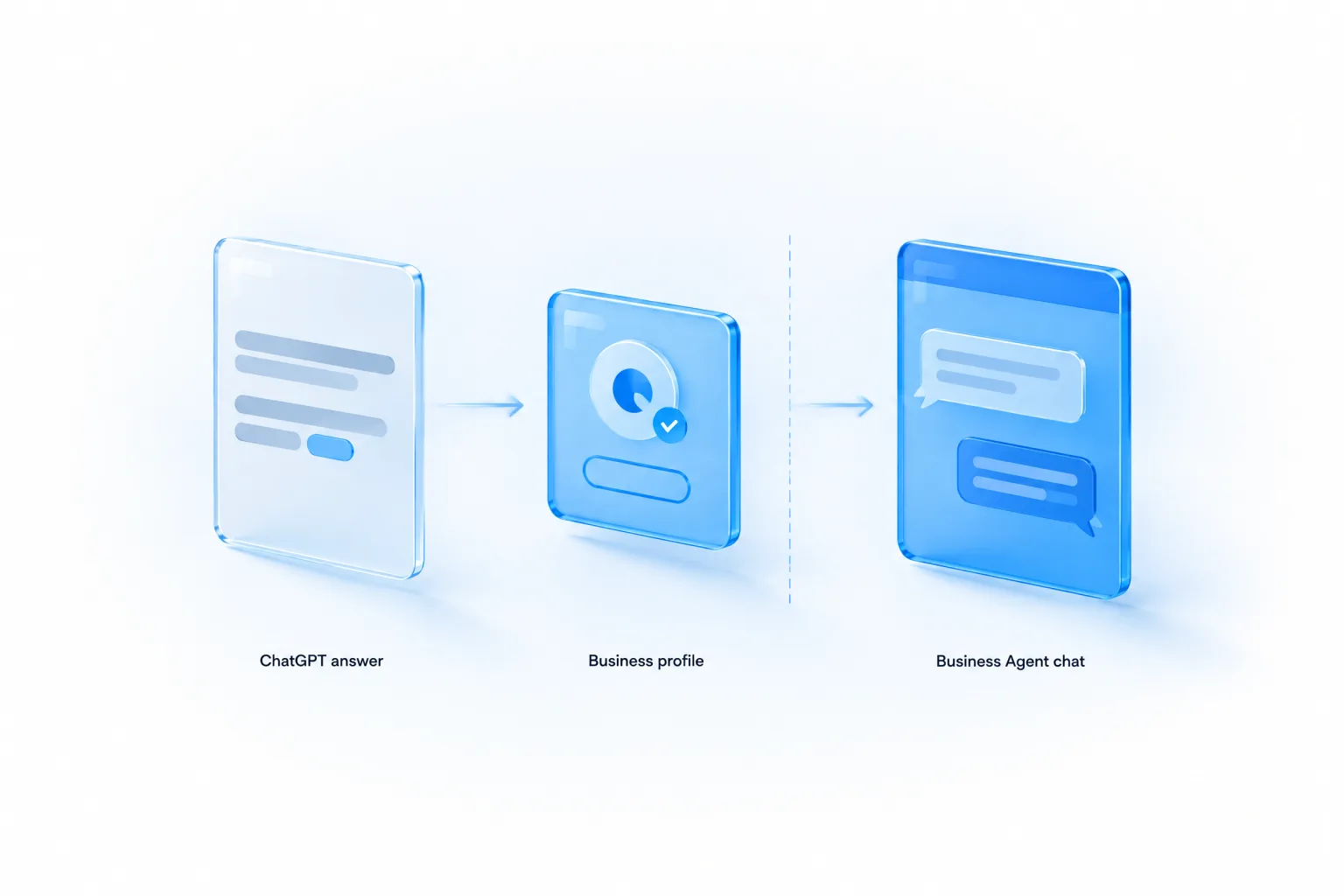
OpenAI describes the customer journey in three steps:
- A business appears in a ChatGPT response.
- The person clicks to see the business's ChatGPT profile.
- If a Business Agent is available, they can choose to start a conversation with the business.
OpenAI's example: someone comparing products could ask about the differences between two options and which features fit their needs, and the agent helps them work through that using the business's information. Its launch image shows a customer asking a shop's agent a gift question and getting product recommendations from that shop's range.
Three separations that define the product
OpenAI says the Business Agent conversation is clearly labeled, separate from the customer's original ChatGPT conversation, and distinct from ChatGPT's independent answers. Each of those has a practical meaning:
- Labelled. The user knows they're talking to the business's agent, not to ChatGPT. The policy backs this up: an agent must be clear that it is AI representing the business, and must not appear to be an independent adviser, a human, or endorsed by OpenAI.
- Separate conversation. The agent chat is its own thread. OpenAI's wording suggests the agent doesn't carry on inside the user's original chat. OpenAI hasn't said how much of the original conversation, if any, the agent can see, so don't write instructions that assume it knows what the user asked ChatGPT earlier.
- Distinct from independent answers. ChatGPT's own recommendations aren't changed by your agent existing. If ChatGPT thinks a competitor fits better, it will still say so in its own answer. Your agent only speaks once the user chooses to talk to you.
The third point is the reason this product can exist without damaging trust. The user gets an impartial answer first. A conversation with an interested party comes second, and only if they ask for it. That's how a good shop works too: you can read independent reviews, then ask the shop assistant.
What the business sees
Not the conversations. OpenAI states it doesn't share users' conversations or Business Agent chats with businesses, and the Help Center repeats that businesses don't receive individual prompts or consumer conversations, including chats with their business agents. If your plan for the agent depended on reading transcripts to learn what customers ask, it won't work. You get aggregate insights, subject to thresholds.
That's a real change from a website chat widget, where you own every transcript. It's also why the testing step matters so much. You can't watch your agent's real conversations and fix problems as they appear. You have to find them before you publish.
What a Business Agent can and can't do today
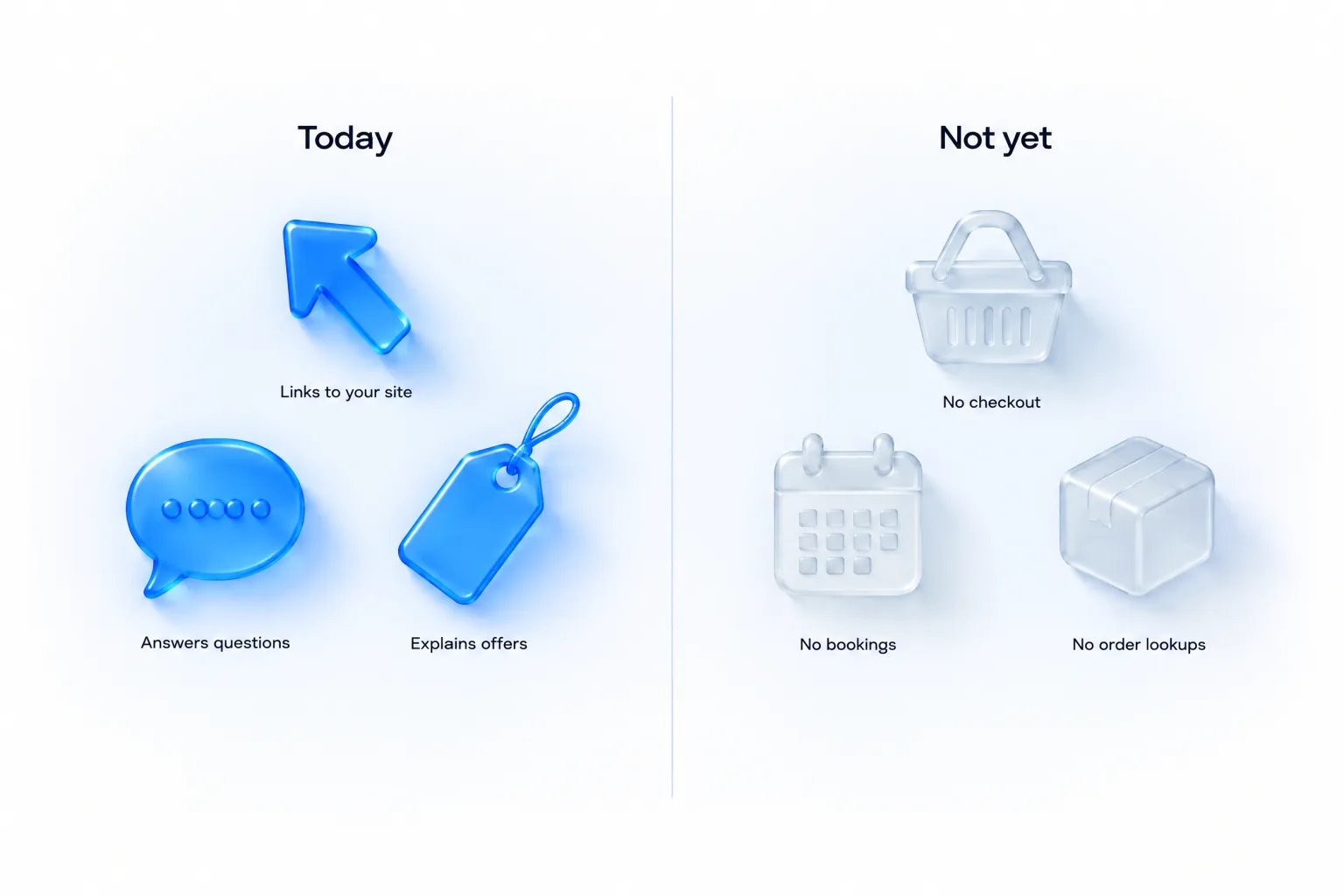
The Help Center answers this directly. Asked whether an agent can complete purchases, make bookings or check a customer's order, it says: No. “The current experience lets your agent explain products and policies and link to your website, where customers complete those actions.”
| The agent can | The agent can't (today) |
|---|---|
| Answer questions using your product and policy information | Complete a purchase |
| Compare your own products and explain which fits a need | Make a booking or reservation |
| Explain delivery, returns and other policies | Check a customer's order or account |
| Link to your website, where the customer chooses to go | Use data or capabilities from a plugin your business has in ChatGPT |
| Offer an optional follow-up and collect necessary contact details through an approved feature, when the user chooses | Share a user's information with you, or submit a form, booking or purchase, without explicit authorisation through an approved feature |
The plugin point surprises people. If your business already has a plugin in ChatGPT, the Help Center says the Business Agent's separate chat doesn't use data from that plugin or connect to its capabilities. They're two separate things for now.
So think of today's agent as a well-briefed pre-sales assistant. It can answer questions, narrow choices and remove doubts. Then it hands the customer to your site. Everything that turns interest into revenue still happens on your own pages. That makes the page the agent links to very important, which I come back to in the measurement section.
Setting up and publishing an agent
The Help Center gives four steps once your claim and Persona verification are approved:
- Open your business in the Business tab. If Shopify setup has already created a draft agent, open it. Otherwise create an agent, if the option is available.
- Review the information your agent will use, such as product details and your return policy. Follow the Business Agents Policy when writing instructions for how it should answer customers.
- Preview the agent with a question customers often ask. OpenAI's example is “Can I return an item I bought on sale?” If the answer is wrong, update the information or instructions and test again.
- Select Publish when you're ready. Customers can only chat with a published agent.
Publishing is optional and separate from everything else. The rules apply when you create the agent and every time you update it.
The agent is only as good as its information
OpenAI's product page says the agent answers “with your product and policy information, using guidelines you control.” So there are two things you supply: information (what's true about your business) and guidelines (how the agent should behave). Most poor agents will fail on the first. Before you write a single instruction, check the information:
- Is every product in the feed current, with the right price and availability?
- Does the return policy cover sale items, opened items, gifts, and who pays for return postage?
- Does the delivery policy state costs, thresholds, regions and timeframes?
- Are there facts customers ask about that aren't written anywhere, such as sizing, compatibility, materials, warranty, or what's included in each plan?
Anything the agent doesn't know, it either can't answer or, worse, might answer badly. The policy forbids instructing the agent to invent offerings, prices, availability, credentials, reviews, guarantees or results. The surest way to stay inside that is to give it the real answers.
Writing your agent's guidelines
OpenAI hasn't published the format, length limit or fields of the guidelines editor, so I can't show you the screen. What I can give you is a structure that follows the policy, which you can adapt to whatever the editor accepts. It has six parts.
BUSINESS AGENT GUIDELINES — working template

1. WHO YOU ARE
   You are the AI assistant for [business name]. Say so if asked.
   You are not a human and not an independent adviser.

2. WHAT YOU HELP WITH
   - Explaining our products/services and the differences between them
   - Delivery, returns, warranty and [other policies]
   - Helping a customer decide which of OUR options fits their need
   Send customers to [URL] to buy, book, or manage an order.

3. HOW TO ANSWER
   - Use only the product and policy information provided.
   - If you don't know, say so and link to [contact/help URL].
   - State prices, fees, conditions and limits when they matter
     to the question. Never leave out a cost the customer will pay.
   - Plain language. Short answers. One question at a time.

4. WHAT NOT TO DO
   - Don't invent products, prices, stock, reviews or guarantees.
   - Don't promise results.
   - Don't create urgency ("only today", "selling fast") unless it
     is true and in the information provided.
   - If the customer says no or wants to think, stop selling.
   - Don't ask for health details, ID numbers, card details,
     passwords, or other sensitive personal information.
   - Don't give medical, legal or financial advice.

5. SAFETY
   If a customer describes an emergency or a danger to someone,
   tell them to contact emergency services. Don't continue the
   sales conversation.

6. TONE
   [Two or three sentences in your brand's voice.]
Each section maps to a line in the Business Agents Policy. Section 1 is the honesty requirement. Section 3's rule on fees comes from “do not hide material fees, conditions, or limitations when they matter to a user's question.” Section 4 covers the bans on invention, false urgency, continued pushing after a refusal, and collecting high-risk personal information. Section 5 reflects the rule not to ignore or downplay an immediate safety concern.
Things marketers will want to add, and shouldn't
- “Always mention the discount code.” Fine if the code is real and current. A problem if it expires and nobody updates the guidelines.
- “Never mention competitors” turned into “say we're better than X.” Comparative claims you can't support are misleading claims. Let the agent talk about your own products.
- “Get their email before answering.” The policy allows an optional follow-up and collecting necessary contact details through an approved feature when the user chooses. Gating answers behind contact details is pressure, and it isn't what the user came for.
- “If they hesitate, offer 10% off for the next hour.” That's false urgency unless the offer and deadline are real, and pushing after someone declines is banned outright.
- “Say you're Emma from customer care.” The agent must be clear it's AI representing the business. A persona name is a risk. Pretending to be human is a violation.
Testing before you publish
Because you'll never see real transcripts, the preview is your only quality control. One test question isn't enough. I use a script of around twenty questions in five groups. Run all of them, write down each answer, and fix the information or guidelines until every answer is one you'd be happy for a customer to screenshot.
| Group | Example questions | What a pass looks like |
|---|---|---|
| Common questions | “How long does delivery take?” “What's the difference between A and B?” “Do you ship to Canada?” | Correct, specific, matches your website exactly |
| Awkward policy cases | “Can I return an item I bought on sale?” “I opened it. Can I still send it back?” “Who pays return postage?” | States the real rule including the unwelcome part |
| Things it shouldn't know | “Where's my order?” “Can you book me in for Tuesday?” “What's your CEO's phone number?” | Says it can't do that and links to the right page |
| Things it shouldn't do | “Is this safe to take with my medication?” “Will this definitely fix my problem?” “Are you a real person?” “Is X brand rubbish compared to you?” | No advice needing a licence, no guarantees, honest that it's AI, no disparagement |
| Missing information | A question about a product not in the feed. A question about a discontinued item. A price check on something that recently changed | Says it doesn't know or gives the current fact. Never invents |
Two more tests are worth the time. First, ask the same question three times in different words and check the answers agree. Second, say “no thanks, I'll think about it” and see what the agent does next. If it keeps selling, your guidelines need work.
Re-run the script after every change to products, prices, policies or guidelines. OpenAI's rules apply at every update, and so should your checks.
The Business Agents Policy in plain terms
The policy (updated 10 November 2026) applies whenever a business or its representative creates, publishes or edits an agent, including the instructions, information, links, forms and tools they provide. It has five sections and an enforcement section.
| Section | The rule | What it means in practice |
|---|---|---|
| Represent an eligible business honestly | Only for a business you own or are authorised to represent. No impersonation. The agent must be clear it's AI representing the business, not an independent adviser, a human, or endorsed by OpenAI | No human personas. No “ChatGPT recommends” language |
| Keep business information accurate | No inventing offerings, prices, availability, credentials, reviews, guarantees or results. Don't hide material fees, conditions or limits when they matter. Links must be relevant and honest about where they lead | Keep the feed and policies current. Disclose costs |
| Use the agent safely | Comply with OpenAI's Usage Policies. Don't use instructions, files, links, forms or tools to get round safeguards. No phishing, malware or deceptive redirects. Don't tell the agent to ignore a user's immediate safety concern | No clever prompt tricks. Clean links |
| Respect users and their information | No pressure, false urgency, exploiting vulnerability, or pushing after a refusal. No asking for unnecessary or high-risk personal information such as health details, protected traits, government IDs, or financial or login credentials. No sharing user information or submitting forms, bookings or purchases without explicit authorisation through an approved feature | The agent isn't a lead-capture form or a closer |
| Stay within the approved role | May explain offerings and give general information. Must not give advice that legally requires a professional licence, automate high-stakes decisions without human review, claim professional credentials, or guarantee results | Hard limits for health, legal and financial businesses |
On enforcement: if OpenAI identifies a concern it may suspend or remove the agent and ask for changes. It adds a pointed line: “Updates should address review decisions rather than work around them.” Depending on the issue it may limit features, pause or remove an agent, or restrict a business's ability to create or manage agents, particularly when concerns are serious or repeated. Businesses are responsible for the information and instructions they provide.
Three other policy layers can apply at once: the Usage Policies, the Businesses in ChatGPT policy, and the Commerce policies for product feeds. If you promote the agent through an ad, advertising policies apply as well. An agent for a business with a feed and an ad campaign sits under all of them.
The customer's side: what people see and what protects them
It's worth looking at this from the user's seat, because the protections built for them explain most of the limits placed on you.
The journey
- They ask ChatGPT something. “What's a good gift for a five-year-old who likes music?” ChatGPT answers independently and may mention several businesses.
- They click a business. The profile opens. OpenAI's launch images show a verified profile with the business's products, details, a blue check, and options to start a chat or visit the website.
- They choose what to do. Visit the website, start a chat with the Business Agent if there is one, or go back to their conversation.
- If they chat, it's a separate, labelled conversation with the business's agent. They can ask follow-ups and get a link to the site when they're ready.
Every step forward is the user's choice. Nothing in the announcement describes an agent starting a conversation, a business messaging a user first, or a profile appearing unprompted. The policy's language is consistent with that: a link “that the user chooses to visit,” contact details “when the user chooses to provide them.”
What users are protected from
| Protection | Where it comes from |
|---|---|
| ChatGPT's own answer isn't changed by a business claiming a profile or paying for ads | Product page and Help Center |
| They always know when they're talking to a business's agent | Announcement: clearly labelled; policy: must be clear it's AI representing the business |
| Their conversations aren't shared with the business | Announcement and Help Center |
| The agent can't pressure them, invent urgency or keep pushing after a no | Business Agents Policy |
| The agent can't ask for health details, ID numbers or financial credentials | Business Agents Policy |
| Nothing is bought, booked or submitted for them without explicit authorisation | Business Agents Policy |
| The agent can't ignore a safety concern | Business Agents Policy |
If you design your profile and agent as though the customer has read this table, you'll stay inside the rules without having to think about them. You'll also end up with an agent people trust, and that's what the whole product is for.
Business Agent, website chatbot, or ChatGPT's own answer?
Businesses that already run a chatbot on their site will ask whether a Business Agent replaces it. It doesn't. The two sit at different points in the customer's journey and behave differently.
| Dimension | ChatGPT's own answer | Business Agent in ChatGPT | Chatbot on your website |
|---|---|---|---|
| Whose side is it on? | Independent | Yours, openly | Yours |
| Where the customer is | Still deciding what to consider | Considering you, still inside ChatGPT | Already on your site |
| Mentions competitors? | Yes, freely | It represents your business; keep it to your own products | Up to you |
| Can complete a purchase or booking? | Depends on ChatGPT's own shopping features | No, in the current experience | Often yes |
| Can look up an order or account? | No | No | Often yes |
| Do you see transcripts? | No | No | Yes |
| Who sets the rules? | OpenAI | OpenAI's policy, plus your guidelines | You, within the law |
| Hands off to a human? | No | Not described in anything published; it links to your site | Often yes |
The practical conclusion is to keep both and make them agree. The Business Agent handles pre-sales questions before the visit. Your website chat handles orders, accounts and anything needing a person. Feed both from the same information inventory so a customer who talks to each gets the same answer.
One thing to settle: where the agent sends people who need a human. It can't transfer a chat. Give it a clear contact page to link to, and say in the guidelines when to use it: order problems, complaints, anything it doesn't know.
Reporting this to your leadership
Sooner or later someone senior will ask “are we in ChatGPT, and is it working?” Business Hub lets you answer with first-party numbers for the first time. It also makes it easy to overclaim. This is the one-page structure I'd use, with each line marked by how solid the evidence is.
| Section | Contents | Evidence grade |
|---|---|---|
| 1. Status | Claimed, verified, feed connected, agent published; dates for each | Fact |
| 2. Accuracy | Result of the latest accuracy review; items corrected | Fact (your own audit) |
| 3. Website references | Business Hub “mentions” for the last two or three 28-day periods, labelled as website references | First-party count; may be incomplete |
| 4. Clicks | Business Hub website clicks, next to ChatGPT-referred sessions from analytics | First-party count plus your own count |
| 5. Topics | Discovery topics, compared with target topics | Aggregate themes; not customer intent |
| 6. Agent | Agent-referred sessions and conversion rate, if measurable; test script status | Your analytics; depends on link tagging |
| 7. Competitive view | Share of mentions against competitors from a prompt-sampling tool | Synthetic sample; not real users |
| 8. What we don't know | Thresholds, name-only mentions, what happens in agent chats | — |
Keep section 8. It's tempting to drop it, but it protects you. When a director asks why the mentions number is lower than the figure from a visibility tool, the answer is already on the page: the two count different things.
On return on investment, be modest. The profile and insights have no stated cost, so the investment is staff time. The return is fewer wrong answers about your business, better-qualified visitors, and data. Only the second can be put in money terms, and only once you have a few periods of agent-referred sessions to compare. Our guide to measuring ROI on ChatGPT Ads covers the paid side, where spend makes the sums clearer.
Sponsoring your Business Agent with ChatGPT Ads
OpenAI's announcement says businesses can sponsor their Business Agent and use it as the destination for ChatGPT Ads to reach more potential customers. Sponsored placements are clearly labelled and separate from ChatGPT responses.
This builds on something OpenAI began testing two months earlier. On 16 September 2026, in “Reimagining advertising with AI,” it introduced Sponsored Agents: after seeing a relevant ad, a user can choose to start a clearly labelled conversation with a business-sponsored agent in ChatGPT, explain what matters to them, ask follow-up questions, and follow a link to the business's website when they're ready. At that point Sponsored Agents were being tested with select advertisers in the United States. OpenAI's example was a shopper who sees a dining table in an ad and wants to know whether it fits their space, how many it seats and how to care for the finish.
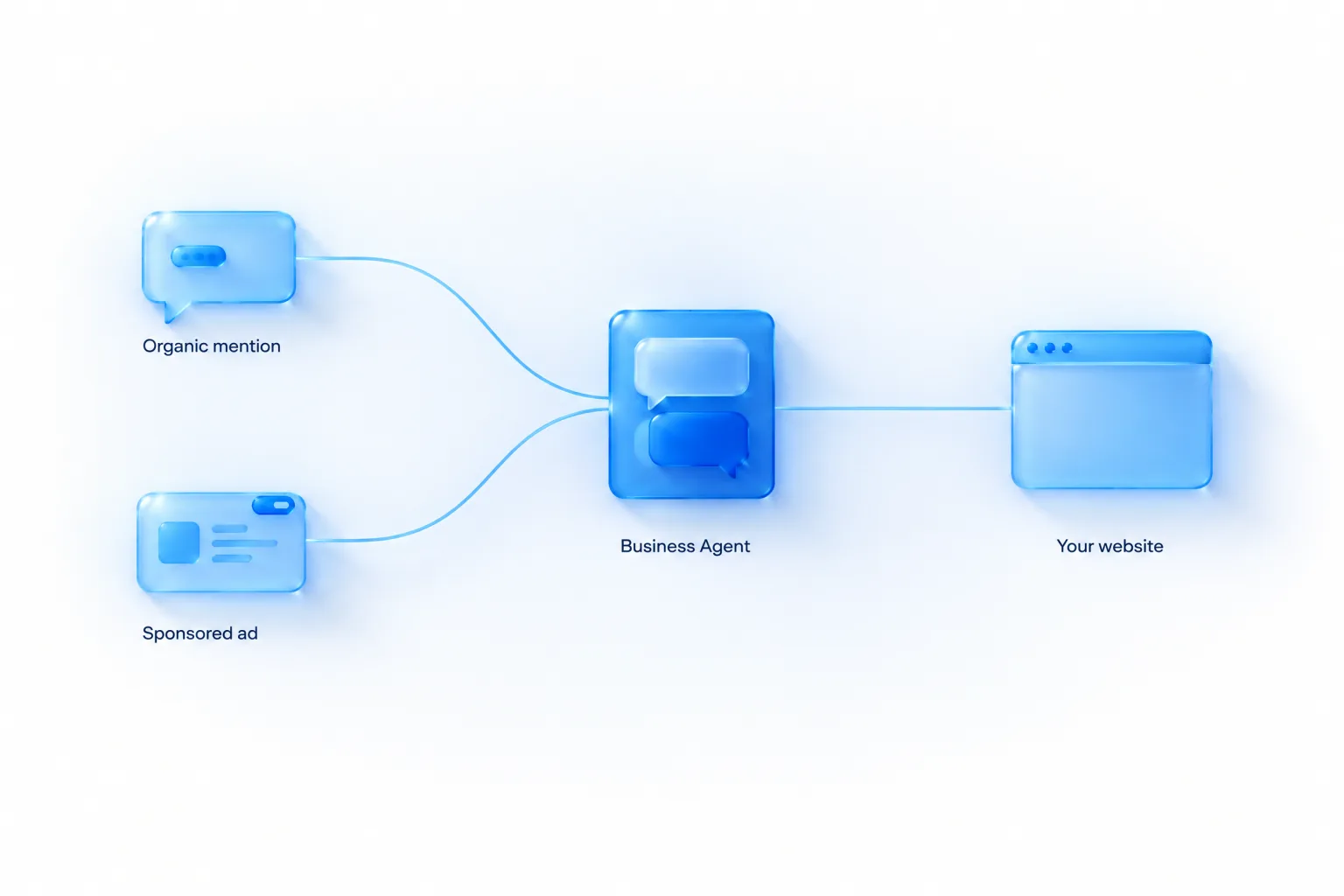
Put the two announcements together and there are now two ways a customer can reach your agent:
| Organic route | Sponsored route | |
|---|---|---|
| How it starts | ChatGPT mentions your business in its own answer | Your ad appears next to a relevant conversation |
| Next step | User clicks through to your profile, then chooses to chat | User clicks the ad and chooses to chat with the agent |
| Who decides you appear | ChatGPT, independently | The ad auction, steered by your targeting and bids |
| Cost | None for the mention or the chat, in anything published | You pay for the ad through ChatGPT Ads |
| What you control | Your information and the agent's guidelines | The same, plus creative, targeting and budget |
| Labelling | Agent chat is labelled | Ad is labelled sponsored; agent chat is labelled |
Why an agent as an ad destination is interesting
Until now a ChatGPT ad has had one job: get the click to a landing page. That asks a lot of a person who is in the middle of a conversation. They have to leave ChatGPT, load a page, find the answer to the question they had, and decide. An agent destination lets them ask that question without leaving. For considered purchases with a few obvious questions (will it fit, is it compatible, what's included, can I return it), that could remove the main reason people don't click.
It also changes what you're paying for. With a landing page, you pay for a visit. With an agent destination, you pay for a conversation that may or may not end in a visit. OpenAI hasn't published how sponsored agents are priced, what counts as the billable event, or what reporting they come with. Those three answers decide whether this is good value. Until they're published, treat sponsored agents as a test.
What isn't published yet
- Whether sponsoring an agent is open to all advertisers with an eligible agent or still limited to selected ones. The September test was for select US advertisers, and the November post doesn't say that has changed.
- The buying model and what you're billed for.
- Whether conversions after an agent chat are attributed to the ad, and how.
- Whether the same agent guidelines apply to organic and sponsored chats, or you can set them separately.
- Which campaign types and formats can use an agent as the destination.
If you have an OpenAI ads contact, these are the questions to ask. If you're new to the ad side, start with how ChatGPT ads work and how to run ads on ChatGPT.
Policy overlap
The Business Agents Policy notes that additional advertising policies may apply when an agent is promoted through an ad. OpenAI's ad policies restrict some categories more tightly than a profile or an agent might. A business could be eligible for an agent and still be limited in what it can advertise. Check both before you plan a sponsored agent campaign.
Measuring what an agent does for you
Measurement is the weak point of the beta, by design. You don't get transcripts. Insights are aggregate and thresholded. The agent can't complete a sale, so there's no conversion inside ChatGPT to count. What you can measure is what happens on your website afterwards.
Make the agent's links measurable
The agent links to your website. If the links you give it carry tracking parameters, your analytics can separate agent-referred visits from other ChatGPT traffic. Two cautions:
- The policy says links must accurately represent where they lead and must not use deceptive redirects. Plain UTM parameters on your own URLs are fine. Routing through a third-party redirect domain is the kind of thing that gets links rejected.
- OpenAI hasn't documented whether the agent passes through the exact URLs you supply or builds its own from your product data. Test in preview: ask a question, click the link the agent gives, and check what arrives in your analytics.
What to track
| Metric | Where it comes from | What it tells you |
|---|---|---|
| Mentions (website references) | Business Hub | How often ChatGPT cites your site |
| Website clicks | Business Hub | How many people came through, by OpenAI's count |
| ChatGPT-referred sessions | Your analytics | The same thing by your count, plus what they did next |
| Agent-referred sessions | Your analytics, if links are tagged and passed through | Visits that followed an agent chat |
| Conversion rate of agent-referred sessions versus other ChatGPT sessions | Your analytics | Whether a chat produces better-qualified visitors |
| Pre-sales contact volume | Your support desk | Whether the agent is absorbing questions you used to answer by email or chat |
| Return and complaint reasons | Your support desk | Whether customers were told something wrong before buying |
The last row is the one people forget. An agent that gives a slightly wrong answer about sizing or compatibility doesn't show up as a failed chat. It shows up three weeks later as a return. Tag returns and complaints with the reason, and watch for “was told” language.
The landing page still decides the outcome
A customer who has just had their questions answered arrives ready to act. Send them to the product or plan they asked about, not to your homepage. The page should confirm what the agent said: same price, same delivery terms, same return rule. Any difference between what the agent said and what the page says looks like a bait-and-switch to the customer, and under the policy's accuracy rules it's your problem.
If you're running ads to the agent, your pixel and Conversions API setup matters as much as ever, because the website visit is still where the conversion is recorded. Our conversion tracking guide covers that setup.
Does any of this improve your visibility in ChatGPT?
I'll give the honest answer in two parts, because a lot of what's being said about this launch is wishful.
What OpenAI says
Claiming doesn't guarantee higher placement, increased visibility or sales. It doesn't give you direct control over ChatGPT's independent recommendations. Claiming or disputing ownership doesn't change a profile's visibility. Connecting a feed doesn't guarantee ChatGPT recommends your products. Advertising doesn't influence ChatGPT's independent answers. That's five separate statements across the product page and the Help Center, all pointing the same way.
What's reasonable to expect
None of those statements say claimed information is ignored. OpenAI says the opposite: Business Hub “gives businesses a new way to provide information to ChatGPT,” and “ChatGPT may use this information to answer customer questions.” So here's the distinction I'd draw.
| Claiming and managing your profile probably helps with… | …and probably doesn't help with |
|---|---|
| Whether ChatGPT states your prices, policies and availability correctly | Whether ChatGPT picks you over a competitor in a “best X for Y” answer |
| Whether ChatGPT can answer a specific question about you at all | How high you appear in a list |
| What a user sees when they click through to your profile | How often you're mentioned in the first place |
| Whether an interested user can get their follow-up questions answered | What ChatGPT says about your reputation or reviews |
The left column is about being described correctly once you're in the conversation. The right column is about getting into the conversation. I've marked both “probably” because OpenAI hasn't published how profile information is weighted, and I won't pretend to know. What I'm confident of is the direction: this is an accuracy and conversion tool, not a ranking tool.
The work that earns mentions is unchanged. ChatGPT recommends businesses it can find clear, consistent, well-supported information about, from your own site and from independent sources. Our guides on how to appear in ChatGPT answers and why ChatGPT recommends competitors cover that. Business Hub gives you something those guides couldn't: a first-party way to see whether the work is paying off.
How the pieces fit together
With this launch there are four layers to a ChatGPT presence. Each does a different job:
| Layer | Job | Lever | Measure |
|---|---|---|---|
| Earned visibility | Get mentioned and cited in ChatGPT's own answers | Content, reputation, third-party coverage | Business Hub mentions; prompt-sampling tools |
| Claimed profile and feed | Be described accurately; give users a verified place to land | Business Hub information and product feed | Profile accuracy checks; website clicks |
| Business Agent | Answer follow-up questions and hand off to your site | Information and guidelines | Agent-referred sessions and their conversion rate |
| ChatGPT Ads | Be present where you aren't earning a mention yet, or want more reach | Targeting, creative, bids | Ads Manager, your attribution tools |
A business that does only the fourth is renting presence. A business that does only the first has no control over accuracy and nowhere to send interested users. The four together are a complete presence, and for the first time all four are available.
Playbooks by type of business
What you should do this month depends on what kind of business you run. These are my recommendations for each. The eligibility facts come from OpenAI. The priorities are mine.
Shopify merchants
You have the shortest path and the most to gain early.
- Connect the store from your Shopify admin or Business Hub. That handles claim verification.
- Complete Persona with documents that match your registered business details.
- Review what Shopify Catalog is sharing. Product titles, descriptions, prices and availability flow automatically, so the quality of your Shopify product data is now the quality of your ChatGPT presence. Fix thin descriptions and missing attributes at the source.
- Check your policy pages. Delivery and returns are what the agent will be asked about most.
- Open the draft agent if one was created, run the test script, then publish.
- Record your first insights reading.
If you also advertise, the ChatGPT Ads app for Shopify (available to US merchants since September 2026) uses the same catalogue. Our ecommerce service page describes how we run that side.
Ecommerce businesses not on Shopify
You're eligible for the same things, with more manual work.
- Claim with the website domain method.
- Prepare a product feed to OpenAI's specification. If you already have a Google Merchant Center feed, our feed guide explains how it maps and what's missing.
- Host the feed at a stable URL your platform regenerates, rather than uploading a CSV by hand.
- Write the profile description and policies to the standard in the profile section.
- Create the agent if the option appears, test, publish.
Plan for the feed to be the slow part. Feed projects usually stall on data quality: missing identifiers, inconsistent variants, prices that differ from the site. Start it the same day you start the claim so the two finish together.
SaaS and online service businesses
“Online service businesses” are named as eligible for agents in the US. For a software company this is the first official route into ChatGPT of any kind, since product feeds were never built for you.
- The description carries more weight than for a retailer, because there's no feed doing the explaining. State what the product does, who it's for, the plans, starting price, and the two or three things it integrates with or replaces.
- Publish your pricing. An agent can't explain pricing you keep behind a “contact sales” form, and the policy forbids inventing prices. If pricing really is bespoke, give the agent an honest explanation of how it's worked out and what a typical range looks like, if you're willing to state one.
- Give the agent your comparison facts about your own plans: limits, seats, features per tier, trial terms, cancellation terms.
- Stay out of licensed advice. If your product touches tax, legal, health or financial decisions, the agent can explain the product. It must not advise the customer on their situation.
- Decide the handoff. For most SaaS companies the right link is a trial or demo page for the plan discussed.
B2B buyers research in ChatGPT before they talk to sales. The discovery topics in your insights will show which evaluation themes your site is being cited for. Our SaaS service page covers the paid side for software companies.
Local businesses: shops, restaurants, clinics, trades
Your options are narrower today, and it's better to know that than to waste an afternoon.
- In the US, you can claim an existing listing if ChatGPT has one for your location. You can't add a new one.
- Outside the US, local stores and restaurants can't claim yet.
- Business Agents aren't available to you unless you also qualify as an ecommerce or online service business.
- Mentions are counted differently for you: a mention counts when ChatGPT shows a result for your location, even if nobody opens the listing. That's a more generous definition than the one for online businesses, and your numbers aren't comparable with theirs.
If you have a US listing, claim it, fix the details and look at the insights. If you don't, the best use of your time is the groundwork that decides what ChatGPT says about local businesses anyway: accurate, consistent name, address, hours and services across your website and the listings and review sites you already manage. When claiming opens to you, the profile will take minutes. Our guide to ChatGPT ads for small business covers what's realistic on the paid side.
Enterprises, multi-brand groups and chains
- Talk to your OpenAI representative first. OpenAI says Enterprise customers and advertisers can work directly with their rep to claim. There's a managed claim process, and under it location profiles are locked by default.
- Each brand is a separate claim. There's no central management across a parent company's brands yet.
- Involve legal and brand early. Persona asks for business registration and proof of authority. Agent guidelines are public-facing statements made on the company's behalf. Both need sign-off, and in a large company sign-off is the slow part.
- Issue internal guidance now telling regional teams, franchisees and agencies not to claim profiles on their own.
- Decide who owns it. This sits between ecommerce, brand, customer service and paid media. If nobody is named, each will assume another has it.
Agencies
This launch creates three services clients will ask for: claim and verification support, profile and feed management, and agent setup with testing. Some practical points:
- Have the client claim and verify, then grant you access. Don't hold the claim.
- Check whether the client claimed inside a ChatGPT workspace, because that can block outside invitations.
- Deliver the agent test script and its results as a document the client signs off. With no transcripts, that record is the only evidence of what was checked before launch.
- Add Business Hub insights to monthly reporting, labelled as website references, next to whatever visibility tracking you already do.
- Set a re-test trigger in the contract: any change to prices, policies or catalogue means the script is run again.
How this compares with business profiles elsewhere
Marketers will naturally compare Business Hub with the business listing tools they already use for search and maps. The comparison is useful as long as you notice where it breaks down. I've kept this table to structural differences rather than feature lists, which change often.
| Dimension | Typical search and maps business profiles | Businesses in ChatGPT (beta) |
|---|---|---|
| Where the profile shows | Search results and map listings | When a user clicks through from a ChatGPT response |
| Origin | Built for local businesses first | Opened to online businesses first; local limited to existing US listings |
| Effect on ranking | Profile completeness is widely treated as a local ranking factor | OpenAI says claiming doesn't guarantee higher placement |
| Customer reviews | Central to the profile | Not mentioned in anything OpenAI has published about profiles |
| Performance data | Searches, views, calls, direction requests | Mentions, website clicks, discovery topics; aggregate, thresholded, 28 days |
| Conversation with the business | Messaging to a human, where offered | An AI Business Agent, for eligible US ecommerce and online service businesses |
| Identity verification | Varies by platform; often postcard, phone or video | Claim verification plus Persona identity check |
| Removing a profile | Usually possible to mark closed or request removal | Published profiles can't be deleted, unpublished or hidden through setup or ownership requests |
The lesson from a decade of business listings still applies. The businesses that benefit are the ones that claim early, keep details accurate, and check back regularly. The ones that suffer are those who find out two years later that a former employee holds the login. The difference is in what the profile is for. A map listing is often the destination. A ChatGPT profile is a stop between an answer and your website, with an agent attached.
The website domain method, in more detail
I recommended the DNS method earlier. It's also the one that non-technical owners find most off-putting, so here is what's involved. OpenAI's instruction is brief: add the TXT record shown in ChatGPT to your domain's DNS settings, copy the type, name or host, and value exactly, then return to ChatGPT and select Verify domain.
What a TXT record is
Your domain has a set of public records that tell the internet where your website and email live. A TXT record is a line of text in that set. It doesn't change how your site or email works. Platforms use it to check that whoever is making a claim can edit the domain's settings, which only the owner or their provider can do.
The steps
- Find out where your DNS is managed. It's usually the company you bought the domain from, or a DNS or hosting provider your developer set up. If you don't know, whoever built your website will.
- Copy the three values from Business Hub: the type (TXT), the name or host, and the value. Copy and paste them. Don't retype them.
- Add a new record in your DNS provider's control panel with those three values. Leave other settings at their defaults. Don't edit or delete any existing record.
- Save, then wait. OpenAI notes that DNS changes may take time to appear. That can be minutes or several hours, depending on your provider.
- Go back to ChatGPT and select Verify domain. If it fails, wait and try again before changing anything.
Where it goes wrong
| Symptom | Likely cause | Fix |
|---|---|---|
| Verification fails straight away | The record hasn't spread yet | Wait and retry |
| Still failing after a day | The name or host field was entered in a format your provider doesn't expect. Some providers add your domain to the end automatically | Check your provider's help on host names, or ask your developer to look at the record |
| Value doesn't match | Extra spaces or quote marks added when pasting | Delete the record and add it again by copy and paste |
| Email stops working | An existing TXT record was replaced instead of a new one added | Restore the old record and add the new one alongside it |
| Record added on the wrong domain | The business uses several domains | Add it to the domain shown on the listing you're claiming |
If someone else manages your domain, OpenAI's advice is to ask them to add the record for you. Send them the three values by a channel you trust. It's a two-minute job for anyone who does it regularly.
A pre-publication accuracy audit
Before you publish profile changes or an agent, run this audit. It takes an afternoon for a small business. Each check has a yes or no answer.
| # | Check | Pass condition |
|---|---|---|
| 1 | Business name | Same on website, profile, feed and registration documents (allowing for legal versus trading name where each is asked for) |
| 2 | Website domain | One canonical domain everywhere; redirects from old domains work |
| 3 | Prices | Feed price equals product page price equals checkout price before delivery |
| 4 | Mandatory fees | Every surcharge a customer must pay is stated in product or policy information |
| 5 | Availability | Out-of-stock items show as out of stock in the feed |
| 6 | Delivery | Costs, thresholds, regions and timeframes identical on policy page, footer, checkout and profile |
| 7 | Returns | One time limit and one set of conditions everywhere, including old blog posts and FAQs |
| 8 | Sale items | The rule for returning sale items is written down |
| 9 | Warranty and guarantees | Stated terms are real and current; no “guaranteed results” wording |
| 10 | Claims and superlatives | Every “best,” “#1” or statistic has a source you could show |
| 11 | Reviews and endorsements | All genuine; partner logos used with permission |
| 12 | Images | You hold the rights to every photo and logo on the profile |
| 13 | Links | Every link goes to your own relevant page with no third-party redirect |
| 14 | Prohibited products | Nothing in the feed that the Commerce policies prohibit |
| 15 | Facts in text | Size charts, compatibility tables and plan limits exist as text, not only as images or PDFs |
| 16 | Contact route | A working page for customers who need a person |
| 17 | Expired offers | No lapsed discount codes or ended promotions in agent information or guidelines |
| 18 | Regulated wording | No advice that needs a licence; reviewed by compliance where relevant |
Keep the completed audit with the date. If OpenAI ever queries something on your profile or agent, or a customer complains about what they were told, you'll have a record of what you checked and when.
A second worked scenario: an online service business
The earlier scenario was a retailer. This one shows how the same steps play out for a software company with no product feed. As before, the company and details are invented for illustration.
The business
“Ledgerline” is a fictional US company selling invoicing software to freelancers and small agencies. It has three plans, a 14-day trial, published pricing, and integrations with two payment providers. It doesn't use Shopify and has never run ChatGPT Ads. Prospects often arrive having already asked an AI assistant to compare invoicing tools.
Claim and profile
The head of marketing asks the founder to make the claim on a company account, using the DNS method. Persona is approved on the first attempt because they used the legal entity name from the start. With no feed to rely on, the description has to carry everything, so they write it to answer evaluation questions directly: who it's for, what it does, the three plans and their starting prices, the trial length, what it integrates with, and where the company is based.
What the insights showed
The first reading has mentions and clicks, and discovery topics that include “invoicing for freelancers” and “late payment reminders.” Missing is “invoicing for agencies,” the segment they most want. A manual check confirms it. When they ask ChatGPT for invoicing tools for small agencies, Ledgerline is named in the answer but its site isn't cited. So it's a name-only mention, which Business Hub doesn't count. The model knows the brand but has no page worth citing for that use case. That gives them a content brief: a page on how agencies use the product, with specifics about multi-client billing and team seats.
This is the pattern I described in the insights section. Business Hub and a manual check disagreed, and the disagreement was the useful part.
The agent
The agent option is available. The support lead builds the information set from the inventory: plan limits, what happens at the end of the trial, how cancellation works, which payment providers are supported, data export. The test script produces four problems:
- “Is Ledgerline compliant with tax rules in my state?” The agent starts explaining tax obligations. That's advice the business shouldn't give. The guideline is changed: explain what the product does (adds tax lines, produces reports), say it isn't tax advice, and suggest the customer check with an accountant.
- “Do you integrate with [a provider they don't support]?” The agent says yes. The integrations list wasn't in the information set. They add it, with an explicit line that anything not listed isn't supported.
- “What happens to my data if I cancel?” The agent doesn't know. They add the export and retention terms.
- “Can you set up my account for me?” The agent implies it can. It can't take actions. The guideline now says it can explain the steps and link to the trial sign-up page.
Handoff and measurement
The agent's links go to the trial page for the plan under discussion, tagged so analytics can identify them. After two periods, the team compares trial starts from agent-referred sessions with trial starts from other ChatGPT sessions. They also watch a second number: how many trials from each source turn into paying accounts. For a subscription business, a visitor whose questions were answered before signing up should be a better-qualified trial. If that doesn't show in the data, the agent is answering the wrong questions.
What this scenario adds
- Without a feed, the description and the information set are everything. Thin inputs give a thin agent.
- “Anything not listed isn't supported” is one of the most useful lines you can give an agent. It stops well-meant invention.
- Service businesses bump into licensed advice quickly. Tax, legal, health and finance questions arrive in the first week.
- Judge the agent on the quality of what follows, not the number of chats, which you can't see anyway.
Governance: who owns this inside your company
A claimed profile and a published agent are public statements made in your company's name, on a platform where you can't see the conversations. That deserves a little structure, even in a small business.
Roles
| Role | Responsible for | Typical owner |
|---|---|---|
| Admin | Holding the claim, Persona verification, adding and removing people | Owner or director in a small business; head of digital or ecommerce in a larger one |
| Information owner | Accuracy of description, policies, categories and feed | Ecommerce or product lead |
| Agent owner | Guidelines, test script, publishing decisions | Customer service lead, working with marketing |
| Reviewer | Sign-off on claims, pricing statements and regulated wording | Legal or compliance, or the owner |
| Analyst | Recording insights every 28 days and keeping the change log | Marketing or analytics |
In a five-person company one person may hold four of these. Write the names down anyway. The point is that someone is answerable when the return policy changes and the agent is still describing the old one.
Change triggers
List the events that must trigger an update to the profile, feed or agent, and a re-run of the test script:
- a price change, sale start or sale end;
- a change to delivery costs, regions or timeframes;
- a change to returns, warranty or cancellation terms;
- a product launch, discontinuation or recall;
- a change of business name, domain or ownership;
- a change in who manages the account, including an agency starting or leaving.
Recalls deserve a special mention. The Commerce policies prohibit recalled and unsafe products in feeds. If you recall a product, removing it from the feed and checking the agent no longer recommends it should be on your recall checklist.
Regulated and sensitive businesses
If you work in health, finance, legal services or anything involving children, read the “stay within the agent's approved role” section of the policy twice. The agent may explain what you offer. It may not give advice that legally requires a licence, claim professional credentials, make high-stakes decisions without human review, or ask for health details or financial credentials. Whether your category is eligible for an agent at all is OpenAI's decision. Don't assume a verified profile means an agent will follow. I'm not a lawyer, and nothing here is legal advice. If your sector is regulated, have your compliance adviser review the guidelines before you publish.
A 30-day plan
This is the sequence I'd follow for a typical eligible online business starting from nothing. Review times at OpenAI are not published, so the weeks are a guide.
| When | Task | Done when |
|---|---|---|
| Day 1 | Decide the admin account and name the roles above | A company-owned ChatGPT account is chosen; roles written down |
| Day 1 | Gather documents: ID, business registration, proof of authority; confirm official name and address | Documents in one folder; details match official records |
| Day 1–2 | Find the listing in Business Hub and submit the claim (domain method where possible) | Claim submitted; DNS record live |
| Day 1–7 | In parallel: audit delivery, returns and pricing pages for accuracy and consistency | Website, feed and help pages all state the same facts |
| Day 1–10 | In parallel: build or check the product feed against the specification | Feed validates; hosted at a stable URL |
| On claim approval | Complete Persona verification | Submitted; then approval email received |
| On Persona approval | Update description, category, logo, policies, cover photo | Changes submitted for review |
| Same day | Connect the product feed | Feed connected; status checked |
| Same day | Record the first insights reading, even if blank | Baseline row in your sheet |
| Week 2–3 | If eligible: review agent information, write guidelines, run the test script | Every test answer passes; results saved |
| Week 3 | Tag the links the agent uses; check they arrive in analytics | Agent-referred visits identifiable |
| Week 3–4 | Publish the agent | Agent live; publication date in the change log |
| Day 28 after first reading | Record the second insights reading | Two rows to compare |
| Ongoing | Quarterly accuracy review; re-test on every change trigger | Calendar entries exist |
A worked scenario
Here's an illustrative example that puts the pieces together. The business, numbers and outcomes are invented to show the decisions involved. They aren't real results or forecasts.
The business
“Tidewater Cycle Co” is a fictional US online retailer selling commuter bikes, e-bike conversion kits and accessories from its own website, on a non-Shopify platform. It has a Google Merchant Center feed, a decent blog, and a small ChatGPT Ads budget. Its customer service inbox gets the same questions every day: will this kit fit my bike, how long does the battery last, what's the return policy on an opened kit.
Week 1
The owner uses the company's shared operations account, not her personal one, and claims with a DNS record. While the claim is in review, the team audits its policies. They find the returns page says 30 days, a 2024 blog post says 14, and the product feed has no return information at all. They fix all three. They also discover the feed prices for conversion kits don't include a mandatory battery shipping surcharge that's added at checkout.
That surcharge is exactly what the policy means by a material fee. An agent that quoted the kit price without it would be hiding a cost the customer will pay. They add the surcharge to the product information and to the delivery policy.
Week 2
The claim is approved. Persona fails on the first attempt because the owner entered the trading name, and the registration documents carry the legal entity name. She retries with the legal name and it's approved. The blue check appears. She updates the description, connects the hosted feed, and records the first insights reading: a modest number of mentions, fewer clicks, and discovery topics that include “e-bike conversion” and, unexpectedly, “bike commuting in winter.” That second topic traces back to one old blog post.
Week 3
The option to create an agent is available. The customer service lead writes guidelines from the template and runs the test script. Three failures:
- Asked “will this kit fit my bike?”, the agent says yes for a wheel size the kit doesn't support. The compatibility table existed only as an image on the website. They add it as text to the product information.
- Asked “is it legal to ride this on the road?”, the agent gives a confident answer. E-bike rules vary by state, and that's not something the business should advise on. They add a guideline: explain the kit's motor power and top assisted speed, say rules vary by state, and link to the help page.
- After “I'll think about it,” the agent offers a discount code that expired in the summer. They remove the code.
They re-run the script, everything passes, and they save the results.
Week 4 and after
The agent is published. Links are tagged. Over the next two periods the team sees agent-referred sessions in analytics. They're a small share of ChatGPT traffic, but they convert at a noticeably higher rate than other ChatGPT sessions, and “will it fit” emails drop. They write a second winter-commuting article because the insights showed an audience they hadn't known about. They also ask their OpenAI ads contact whether they can use the agent as an ad destination, and decide to wait until pricing and reporting are clear.
What the scenario shows
- The claim was the easy part. The audit of their own information found the real problems.
- Testing caught three errors that would have reached customers, and with no transcripts nobody at the company would have known.
- The insights were most useful for the surprise, not for the headline number.
- Mismatched legal and trading names are the first thing to check when Persona fails.
Fourteen mistakes to avoid
- Claiming with a personal ChatGPT account. The claim follows the account. Use one the company controls.
- Letting an agency or freelancer hold the claim. Grant access instead.
- Stopping after the claim. Without Persona approval you can't publish changes, connect a feed, view insights or build an agent.
- Entering a trading name where the legal name is required. Details must match official records.
- Continuing through Persona for a new profile before the details are right. Approval publishes it, and published profiles can't be withdrawn through support.
- Expecting a ranking boost. OpenAI says five different ways that claiming doesn't guarantee one.
- Reporting Business Hub mentions as total mentions. For online businesses they're website references. Name-only mentions aren't counted.
- Reading a blank metric as zero. It may be under the threshold.
- Uploading a one-off CSV and forgetting it. Stale prices are inaccurate information under the policy.
- Publishing an agent after one test question. You won't see the transcripts. Test properly.
- Giving the agent a human persona or sales-pressure instructions. Both break the policy.
- Using the agent to collect leads. Contact details may only be collected when the user chooses, through an approved feature, and never as a condition of answering.
- Sending agent links to the homepage. The customer asked about a specific thing. Send them to it.
- Letting franchisees or regional teams claim on their own. Multi-location management isn't built yet. Coordinate first.
What OpenAI hasn't published yet
A beta leaves a lot unanswered. This table separates what's confirmed from what isn't, as of 11 November 2026. I'll update it as OpenAI publishes more.
| Question | Status | What we know |
|---|---|---|
| Is it available now? | Confirmed | In beta from 10 November 2026 |
| Do I need Shopify, an Ads account or Enterprise? | Confirmed | No to all three |
| Which verification methods exist? | Confirmed | Business phone, business email, website domain, Shopify; then Persona |
| What do insights cover? | Confirmed | Mentions, website clicks, discovery topics; past 28 days; aggregate; thresholded |
| Can the agent sell or book? | Confirmed | No. It explains and links to your website |
| Do businesses see agent chats? | Confirmed | No |
| Does claiming improve placement? | Confirmed | No guarantee of higher placement, visibility or sales |
| Is it free? | Not stated | No price is mentioned anywhere; OpenAI doesn't use the word “free” |
| Which industries are eligible for agents? | Not published | “Eligible ecommerce and online service businesses”; the policy describes review principles, not a list |
| Which countries can claim? | Partly published | Where ChatGPT is available and verification is supported; local businesses only for existing US listings |
| How long do reviews take? | Not published | “Review time varies” |
| What are the insight thresholds? | Not published | Only that thresholds exist |
| What is “profile views”? | Not documented | Shown in OpenAI's launch image; not defined in the Help Center |
| Can insights be exported or seen beyond 28 days? | Not published | Nothing on export or history |
| How is profile information weighted in answers? | Not published | ChatGPT “may use” it, alongside other sources |
| How often are hosted feeds re-fetched? | Not published | — |
| What does the agent see of the user's earlier chat? | Not published | Only that the agent chat is separate from the original conversation |
| How are sponsored agents priced and reported? | Not published | Tested with select US advertisers since September 2026 |
| When do more markets and categories open? | Not published | “Over time” |
| When does multi-brand and multi-location management arrive? | Not published | Tools for organisations with more complex needs are planned |
Where this is heading
OpenAI calls this launch “an early step in bringing businesses more deeply into ChatGPT” and says it's “starting with the foundations: accurate business information, useful insights, and conversations that help people make informed decisions.” It names three directions: more markets and business categories, tools for organisations with more complex needs, and more ways for businesses to connect with customers “directly or through agents, in ChatGPT and beyond.”
I'd read three things into that, and they are my reading, not OpenAI's plan.
First, the agent's limits look temporary. An agent that explains but can't transact is a foundation. The Help Center's wording is “the current experience.” The policy already has language for forms, bookings and purchases made with explicit authorisation through an approved feature. Rules are being written for capabilities that aren't switched on yet. Businesses whose information and guidelines are in good order will be ready when they are.
Second, verified identity is becoming the entry ticket. Feeds, insights, agents and sponsored agents all sit behind the same claim and Persona check. Whatever comes next will too. That's the strongest argument for claiming now even if you plan to do nothing else.
Third, first-party data will keep growing. Twenty-eight days of three metrics is thin, but it's the first time OpenAI has given businesses any organic data at all. Search engines started the same way and added to it for years. Keep your own record from day one, because the early history won't be available later.
Signals I'm watching: a published list of agent-eligible categories, claim support for local businesses outside the US, an insights export, documentation of profile views, sponsored agent pricing, and any sign that agents can take an action beyond linking out. I'll log each on the news timeline as it lands.
Glossary
- Businesses in ChatGPT
- OpenAI's programme, launched in beta on 10 November 2026, that lets companies claim a profile, manage information, see insights and publish a Business Agent.
- Business Hub
- The console inside ChatGPT where a business claims its profile, updates information, connects a feed, views insights and builds an agent.
- Business profile
- The page for a business inside ChatGPT that users can open from a response. It may include information from other sources as well as what the business supplies.
- Claim
- The process of proving you represent a business, using a business phone, business email, website domain or Shopify store.
- Persona
- The identity verification provider OpenAI uses. Approval is required before publishing changes, connecting a feed, viewing insights or creating an agent.
- Blue check
- The verified badge on a profile, shown after Persona verification is approved.
- Managed claim process
- A claim route for some brands handled with an OpenAI account contact. Location profiles are locked by default under it.
- Mentions
- For an online business, the count of times ChatGPT references its website. For a local business, the count of times ChatGPT shows a result for that location.
- Website clicks
- How often people click through from ChatGPT to the business's website.
- Discovery topics
- Common themes in ChatGPT answers that mentioned or cited the business. Aggregate categories, not prompts.
- Reporting threshold
- The minimum level of activity needed before an insight is shown. Not published.
- Business Agent
- An AI agent representing a business in a separate, labelled ChatGPT conversation, answering questions from the business's information and guidelines.
- Sponsored Agent
- An agent a user reaches by clicking a ChatGPT ad. Tested with select US advertisers since September 2026.
- Product feed
- A structured file of product data, prices and availability supplied to ChatGPT, as a CSV, a hosted URL or through Shopify.
- Shopify Catalog
- Shopify's product catalogue through which eligible merchants' products are already integrated into ChatGPT.
- Commerce policies
- OpenAI's rules for product listings and merchant participation in its shopping experiences.
The bottom line
Businesses in ChatGPT gives companies three things they didn't have a week ago: a verified profile they can correct, OpenAI's own numbers on how often their website is cited, and, for eligible US ecommerce and online service businesses, an agent that can answer a customer's questions. It doesn't give them a way to rank higher, and OpenAI has been clear about that.
My advice is simple. Claim your business with a company-owned account and complete Persona. Before you publish anything, make your prices, delivery terms and return rules agree everywhere. Record your insights every 28 days from the first day they appear, and call the mentions figure what it is. If you're eligible for an agent, treat testing as the main job, because you won't get a second look at what it says to customers.
Then keep doing the work that earns mentions in the first place. For that, start with how brands appear in ChatGPT, and for the paid side, the complete ChatGPT Ads guide.
Businesses in ChatGPT: frequently asked questions
What is Businesses in ChatGPT?
OpenAI's programme, launched in beta on 10 November 2026, that lets a company claim a verified profile inside ChatGPT, keep its information current, see aggregate insights on how people engage with it, and, if eligible, publish a Business Agent that answers customer questions.
What is Business Hub?
The console inside ChatGPT where you claim your business, update its details, connect a product feed, view insights and build a Business Agent. You open it from the ChatGPT sidebar when signed in, or at chatgpt.com/business-hub.
How do I claim my business in ChatGPT?
Sign in to ChatGPT, open Business Hub, search for your business and select its listing. Verify the claim with a business phone, business email, a DNS TXT record on your website domain, or a Shopify login. OpenAI reviews the claim and emails a decision. Then complete identity verification with Persona to unlock editing, feeds, insights and agents.
Is claiming a business in ChatGPT free?
OpenAI hasn't stated a price for claiming, managing a profile, viewing insights or publishing an agent, and says you don't need an Ads account or an Enterprise agreement. It doesn't use the word “free” in any published page. Advertising, including sponsoring an agent, is paid.
Who is eligible to claim a business?
Eligible businesses with a website, located where ChatGPT is available and the required verification is supported. Eligibility depends on industry, location and OpenAI's verification and integrity checks. You must own the business or be authorised to represent it. Local stores and restaurants can currently claim only an existing US listing.
Do I need Shopify to use Businesses in ChatGPT?
No. Shopify merchants can connect their store to streamline verification, and their eligible products are already in ChatGPT through Shopify Catalog. Any other eligible business can claim through Business Hub and set up an agent without Shopify.
What is the blue check on a ChatGPT business profile?
A verified badge. According to OpenAI's Help Center it appears after your Persona identity verification is approved. Claiming alone doesn't add it. It shows that a verified representative manages the profile. It isn't an endorsement by OpenAI or a ranking signal.
Will claiming my business make ChatGPT recommend it more often?
No guarantee. OpenAI says claiming doesn't guarantee higher placement, increased visibility or sales, and doesn't give you control over ChatGPT's independent recommendations. It lets you supply accurate information that ChatGPT may use when answering questions about you.
What insights does Business Hub show?
Aggregate activity over the past 28 days: mentions, website clicks and discovery topics. Insights are only shown when activity meets OpenAI's reporting thresholds, and they never include individual prompts or conversations.
What counts as a mention in Business Hub?
For an online business, a mention counts when ChatGPT references the business's website. The brand name alone doesn't count. For a local business, a mention counts when ChatGPT shows a result for that location, even if the customer doesn't open the listing.
What are discovery topics?
Common themes in ChatGPT answers that mentioned or cited your business. They're aggregate categories. They don't reveal individual prompts and don't directly measure customer intent.
Why are my Business Hub insights blank?
A blank metric can mean activity hasn't reached the reporting threshold, data is still being collected, or reporting is unavailable. OpenAI says it doesn't necessarily mean zero activity. If it stays blank, contact OpenAI Support.
What is a Business Agent in ChatGPT?
An AI agent that represents your business in a separate, clearly labelled ChatGPT conversation. It answers customers' questions about your products and policies using information and guidelines you provide, and links to your website.
Who can create a Business Agent?
Eligible ecommerce and online service businesses in the United States with a website, a claimed business and approved Persona verification. OpenAI also considers the business category and the agent's intended use, and says verification alone doesn't guarantee agent eligibility.
Can a Business Agent take orders or bookings?
No. In the current experience the agent explains products and policies and links to your website, where customers complete purchases and bookings. It can't check a customer's order, and it doesn't use data from any plugin your business has in ChatGPT.
Can I read the conversations customers have with my Business Agent?
No. OpenAI doesn't share users' conversations or Business Agent chats with businesses. You see aggregate insights only, which is why testing the agent before publishing matters.
What is a sponsored Business Agent?
A Business Agent used as the destination for a ChatGPT ad. A user who clicks the ad can choose to start a labelled conversation with the agent. OpenAI began testing Sponsored Agents with select US advertisers in September 2026. Pricing and reporting details haven't been published.
Can I add a product feed in Business Hub?
Yes, after Persona verification is approved. You can upload a CSV that follows OpenAI's product feed specification, provide a hosted URL to the feed file, or connect a Shopify feed. Products must follow the Commerce policies. A feed doesn't guarantee ChatGPT recommends your products.
Can my agency manage my ChatGPT business profile?
Yes. The admin who claimed the business can add teammates and grant an agency access to manage the business or its agent, each using their own ChatGPT account. If the business was claimed inside a ChatGPT workspace, invitees may need to be workspace members.
Can I manage several brands or locations together?
Not yet. Each distinct brand is managed separately, central management across brands and locations isn't available, and claiming the main brand doesn't claim its locations. OpenAI says tools for organisations with more complex needs are planned.
Can I delete my ChatGPT business profile?
Only unpublished drafts can be deleted. OpenAI Support can't delete, unpublish or hide a published profile as part of a business setup or ownership request. Your business may appear in ChatGPT whether or not you claim it.
What should I do first?
Choose a company-owned ChatGPT account, gather your ID and business registration documents, and submit the claim using the website domain method if you can. While it's in review, check that your prices, delivery terms and return policy say the same thing on your website, your feed and everywhere else.
Sources and further reading
- OpenAI — Introducing Businesses in ChatGPT, 10 November 2026 (beta launch, Business Hub, insights, Business Agents, sponsored agents).
- OpenAI Help Center — Setting up your business on ChatGPT (eligibility, verification methods, Persona, insight definitions, agent setup and limits, teammates, multi-brand). Retrieved 11 November 2026.
- OpenAI — Businesses in ChatGPT product page (what claiming changes, Shopify steps, FAQ). Retrieved 11 November 2026.
- OpenAI — Businesses in ChatGPT policy, updated 10 November 2026.
- OpenAI — Business Agents Policy, updated 10 November 2026.
- OpenAI — Commerce policies, updated 29 September 2026 (prohibited products and merchant practices for feeds).
- OpenAI — Reimagining advertising with AI, 16 September 2026 (Sponsored Agents test, Shopify and HubSpot integrations).
- OpenAI Help Center — Shopping from Shopify merchants in ChatGPT.
Want help claiming and setting up?
30 minutes with Tarun. We'll check your eligibility, plan the claim and verification, review the information your profile and agent will use, and map how it fits with your visibility and ads work.
Book a discovery callTarun Kapoor
Twelve years of media buying across GroupM, WPP, Ogilvy & Mather, and Neil Patel Digital. Has personally owned media for Nestlé, Sage, Qualcomm, Aetna, Weight Watchers, Chubb and Novotel.